Table of Contents
Brand-New Elastic Email x IFTTT Integration: Automate Contact Management and Email Workflows
In the digital world, automation is key to efficiency. Businesses cannot afford to waste time and money on repetitive tasks manually and be left behind by their competitors. Especially for growing businesses, automation is key to efficiency. At Elastic Email, we offer a wide range of integrations - from signup forms, contact management, through ecommerce, to CMS, workflow automation, project management, and more. But now, the powerful combination of Elastic Email, a robust email marketing and delivery platform, and IFTTT, a popular automation service, comes into play. This article will explore how Elastic Email and IFTTT integration can revolutionize your email workflows, saving you time and eliminating manual data entry.
Table of Contents
What is IFTTT?
IFTTT stands for If This Then That, and it is a platform that allows you to connect various tools you use to create automated workflows between them, called “Applets”. An Applet is triggered by changes that occur in one web service (the “If This” part) and then performs an action in another web service (the “Then That” part). For example, if something happens in Gmail, then do something on Facebook.
How does Elastic Email x IFTTT integration work?
The integration between Elastic Email and IFTTT empowers users to automate various email marketing tasks by leveraging Elastic Email's triggers and actions within IFTTT Applets. This means you can set up automated workflows where specific events in Elastic Email (triggers) can initiate actions in other connected services, or actions in other services can trigger events within Elastic Email.
How to integrate Elastic Email with IFTTT
In order to connect Elastic Email with IFTTT, you will use an OAuth authentication process. First, you need to log in to your IFTTT account and use the search bar to find Elastic Email.
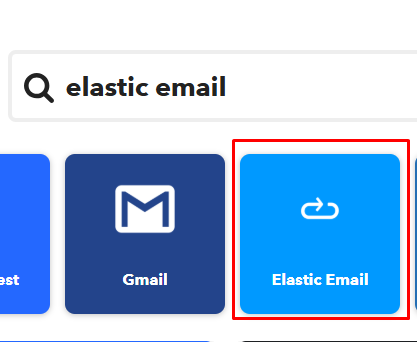
Once you find it, click on the service and select Connect. Then, a new browser window will open, redirecting you to the Elastic Email login and authorization screen. Enter your Elastic Email credentials and authorize the connection. Once you log in, the window will close, and the service will show as “Connected” in IFTTT.
Creating an Applet
As we already mentioned, IFTTT operates on a simple logic: “If This (Trigger), Then That (Action).” That is why you need to choose the tool you want to connect with your Elastic Email account, and choose the trigger and the action it will activate.
To do this, you need to click Create on the IFTTT home screen. First, click If This and search for a trigger service. Next, click Then That and search for the action service.


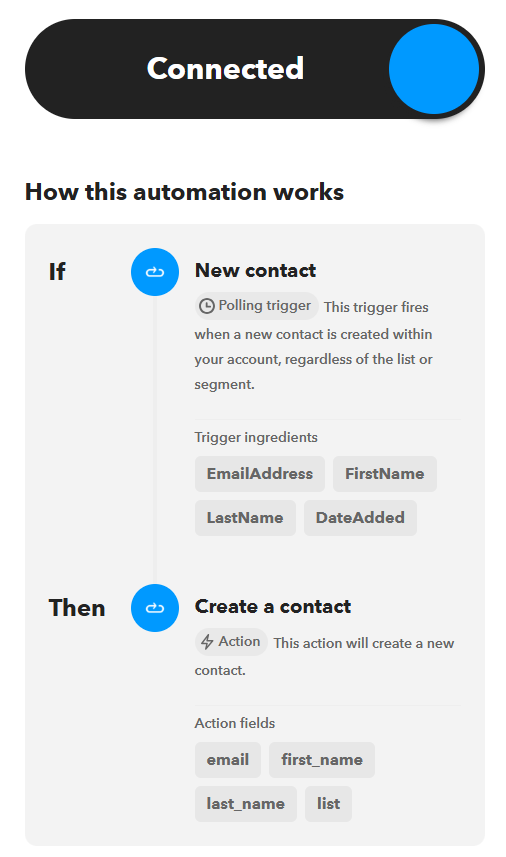
Follow the prompts to map the data fields between the two services and click Finish. For example, If there’s a new Calendly invitee, then add them to an Elastic Email contact list. Or, if a new contact is added, then a new contact is created.
Triggers, Actions, and Queries
When creating your Applets, you can choose from various triggers, queries, and actions.
Triggers:
- New contact - when you add a new contact within your account, regardless of the list or segment.
- New list - when you create a new list.
- Campaign sent - when you send any campaign from the user’s Elastic Email account.
- Email sent - when you send an email from the user’s Elastic Email account.
Actions:
- Create a contact
- Unsubscribe email address
Queries (to request additional data):
- Find contact - this query returns a contact’s details by email
- Find list - this query returns a list with the specified name
To know more, visit our help article on how to integrate Elastic Email with IFTTT.
Conclusion
The integration of Elastic Email with IFTTT offers a powerful solution for automating your email marketing and communication tasks. By setting up custom Applets, you can connect Elastic Email with hundreds of other web services, creating efficient workflows that save time, reduce manual effort, and enhance your overall productivity. Embrace automation and unlock the full potential of your email marketing strategy with Elastic Email and IFTTT.
Enjoying this Content?
You can receive articles like this straight to your inbox.
Sign up for our newsletter and get a dose of email marketing knowledge every month!
FAQ
If you like this article, share it with friends:


Ula Chwesiuk
Ula is a content creator at Elastic Email. She is passionate about marketing, creative writing and language learning. Outside of work, Ula likes to travel, try new recipes and go to concerts.

Eager to put this knowledge to some use?
Try one of our products!


