
Table of Contents
DMARCRadar by Elastic Email: DMARC Explained & Guide to the New Monitoring Tool
Email was never automatically built with authentication. Anyone, anywhere, can put your domain in the "From:" field of a message and send it to the world. Unless you've told the receiving mail servers otherwise, they'll happily deliver it. That gap is why DMARC exists, and it's why Elastic Email has spent years helping senders close it, from a free DMARC generator to its newest release: DMARCRadar - a continuous DMARC monitor that launched this month as part of the Elastic Email Tools set.
Table of Contents
TL;DR - Elastic Email DMARCRadar & DMARC Generator
- DMARCRadar is a continuous DMARC monitor with a free public checker and a signed-in dashboard.
- The public domain checker is free with no signup. The signed-in monitoring product requires an account.
- DMARCRadar checks DMARC, SPF, and DKIM configuration, plus ongoing authentication results from real mail flow.
- It probes 38 common DKIM selectors (Google, Microsoft, Elastic Email, Mailchimp, Postmark, and more) in parallel.
- Each monitored domain gets a 0-100 health score and an A-F letter grade.
- Elastic Email's free DMARC generator builds the initial DMARC TXT record, while DMARCRadar monitors it afterward.
What is DMARC?
DMARC (Domain-based Message Authentication, Reporting, and Conformance) is an email authentication standard that tells receiving mail servers what to do with messages that claim to come from a domain but fail to authenticate. It works by connecting two other standards, SPF and DKIM, to the domain shown in a message's visible "From:" address.
- SPF (Sender Policy Framework) is the DNS record listing which servers are allowed to send mail on behalf of a domain.
- DKIM (DomainKeys Identified Mail) is a cryptographic signature attached to outgoing mail, letting receivers confirm the message wasn't altered in transit.
- DMARC ties SPF and DKIM results to the visible From: domain and instructs receivers to accept, quarantine, or reject mail that doesn't align.
Why does DMARC matter?
Without DMARC, anyone can put a legitimate-looking domain in a message's From: field, and mailbox providers will deliver it. That gap enables phishing, invoice fraud, and brand impersonation, and it costs real money: phished customers, refund disputes, and deliverability penalties, since major mailbox providers now require DMARC for bulk senders.
Publishing a DMARC record is only the first step. The harder, ongoing problem is everything that happens after. It can be a marketing platform that never got DKIM configured, a vendor sending from a forgotten subdomain, or an attacker probing a domain from an unfamiliar IP range. None of that is visible from a one-time DNS lookup. It only shows up in the daily aggregate reports DMARC generates. It is an XML feed that goes unread unless a tool is built to parse it.
What is Elastic Email's DMARC generator?
Elastic Email's DMARC generator is a free tool that builds a syntactically correct DMARC TXT record for a domain, without requiring the user to write the record by hand. And DMARC syntax is unforgiving. A misplaced tag, a wrong policy value, or a missing rua= reporting address can leave a domain silently unprotected or break legitimate mail once enforcement kicks in. The generator removes that risk by producing a record that's ready to paste into a DNS provider.
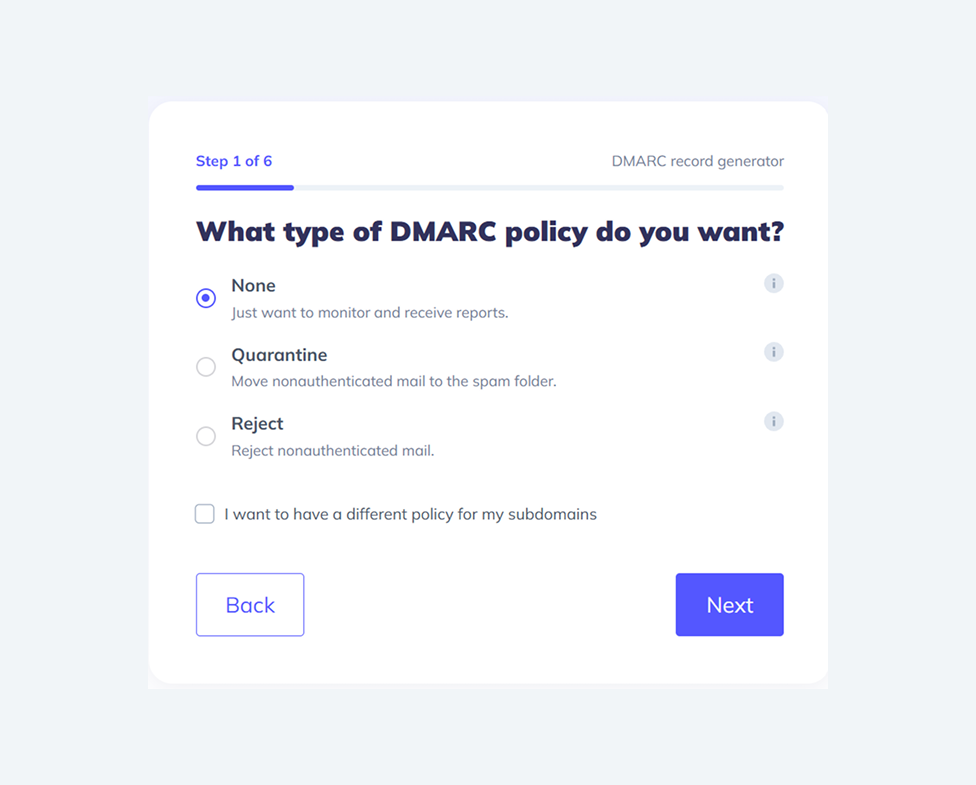
First, you choose what type of DMARC policy you want - none, quarantine, or reject. Then, you select what percentage of your emails should be analyzed and whether you want to receive aggregated and forensic reports about emails that failed the DMARC check. Lastly, you choose how strictly DMARC should check SPF and DKIM entries. As a result, you get a generated record you can copy and add to your DNS zone as a TXT record with the name _dmarc.
The generator is scoped to a single job: produce a correct, publishable record. It doesn't track what happens after that record goes live. That's the gap DMARCRadar fills.
What is DMARCRadar?
DMARCRadar is Elastic Email's continuous DMARC monitoring tool. Where the generator answers "is my record configured correctly?", DMARCRadar answers "is it actually protecting me, and who is using it?" You can use it as a public checker if you don’t have an Elastic Email account or as a signed-in product.
Key features of the signed-in product
- Comprehensive health view - every monitored domain gets a 0-100 health score and an A-F letter grade, based on DMARC, SPF, DKIM, MTA-STS, TLS-RPT, and BIMI, with issues rolled into one prioritized list.
- Top sources ranked by volume - senders are ranked by how much mail they send, not by pass rate - so the biggest unfamiliar senders (often the ones worth investigating)appear first. Each source resolves to a reverse-DNS name, ASN, and, when recognized, its email service provider.
- Full drill-down ledgers - every aggregate report and every individual record is preserved and searchable, so raw data is available if a security team needs it.
The rule engine behind the free public checker is the same one driving the in-product DNS posture view, so the read on a domain's configuration is consistent whether or not the user has signed up.
DMARCRadar: public checker vs. signed-in product
| Public checker | Signed-in product | |
|---|---|---|
| Cost | Free, no signup | Requires an account |
| Check type | One-time snapshot | Continuous, ongoing monitoring |
| Input | Any domain | Domains you add and verify |
| DMARC/SPF/DKIM read | Yes, with severity-ranked findings | Yes, same rule engine |
| DKIM selector probing | 38 common selectors, plus manual header paste fallback | Same, integrated into DNS posture view |
| Sender-level visibility | No | Yes - who's sending, from where, pass/fail |
| Health score & grade | No | Yes, 0-100 score and A-F grade per domain |
| Historical trends | No | Yes - timelines, per-sender ledgers, drill-down reports |
| Policy-escalation guidance | No | Yes - readiness rule flags when it's safe to move toward enforcement |
Who is DMARCRadar for?
DMARCRadar is built around three types of users:
- Founders and small-team operators checking one or two domains, who want a clear "am I safe?" answer.
- IT and security leads managing continuous authentication evidence across a handful of corporate domains, deciding when it's safe to move from p=none to p=reject.
- Mail-platform operators running many domains across brands, who need a fleet-wide view and API access to feed their own dashboards.
Enjoying this Content?
You can receive articles like this straight to your inbox.
Sign up for our newsletter and get a dose of email marketing knowledge every month!
Frequently asked questions
If you like this article, share it with friends:


Ula Chwesiuk
Ula is a content creator at Elastic Email. She is passionate about marketing, creative writing and language learning. Outside of work, Ula likes to travel, try new recipes and go to concerts.


Eager to put this knowledge to some use?
Try one of our products!


