
Table of Contents
Elastic Email Introduces Inbox Teams Feature
The ability to stay in touch with customers efficiently is crucial for businesses of all sizes. Elastic Email Inbox has always had team and customer communication in mind. It’s a robust platform centralizing customer conversations, ensuring that every email, chat, and message is noticed, stored, and managed effectively. However, as the business grows, the customers' inquiries become more diverse and may need a response from particular teams. It requires a more structured approach so that customer conversations reach the right people in your company. That is why we’re happy to announce a significant enhancement to the Elastic Email Inbox Help Desk - Teams, to help you organize conversations by functional groups within one organization.
Table of Contents
- How the Teams feature works in Elastic Email Inbox
- Convenient Teams creation and management
- Assigning conversations to Teams and mentioning teammates
- Conclusion - empowering your Help Desk with Teams
- FAQ
- Claude responded: Teams is a help desk organization feature in Elastic Email Inbox that lets you group agents by department or function — such as Support, Sales, or Billing — an…
How the Teams feature works in Elastic Email Inbox
The Teams feature in Elastic Email Inbox lets you divide Help Desk conversations by particular groups. For example, Support, Sales, Billing, etc. It means that all conversations regarding customer support will be assigned to the “Support” team, whereas all inquiries related to the billing team will be assigned to “Billing”. As a result, all members of a particular team will see the conversation and can respond to it faster and more effectively. Owing to Teams, your Help Desk remains agile and responsive. It also adapts to the evolving structure of your business and the dynamic nature of customer interactions.
When you log into the Inbox Help Desk dashboard, all teams created will be visible below the Inboxes section.
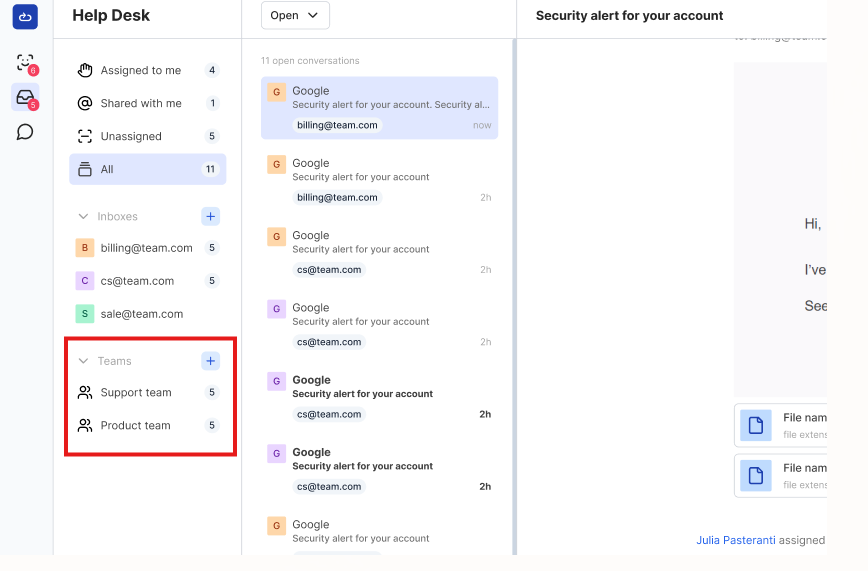
Each team appears separately, listing conversations assigned to that Team. The number next to the Team name is the number of open conversations assigned to this team.
Every user has their own access level and role. Members only see the Teams they are part of. Admins and Account Owners can see all Teams in the organization and can manage them and their members.
Convenient Teams creation and management
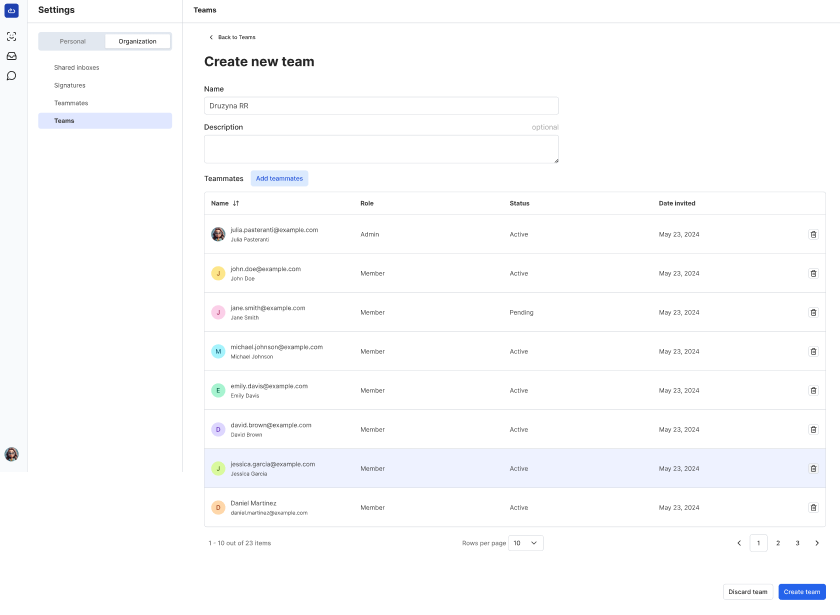
The power of the Teams feature lies in its intuitive approach to organization. All Team management happens in Organization Settings. When you click on Teams, you enter a centralized hub with a clear overview of all teams. You will see the of your teams names and the number of active members. You can easily create a new Team, assign its name, an optional description, and add teammates.
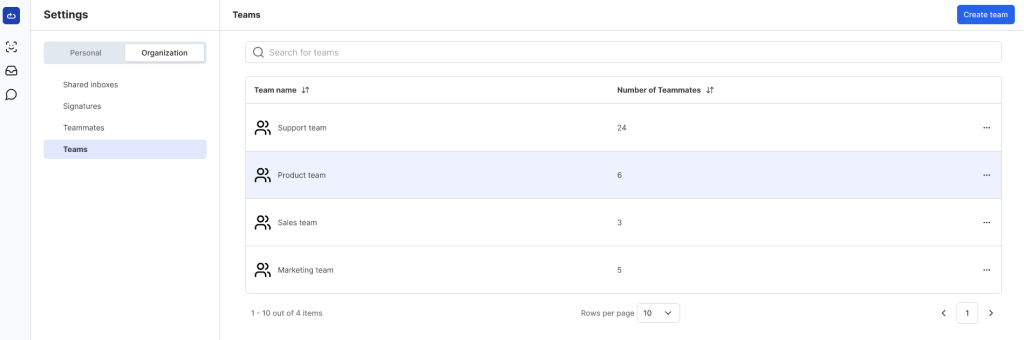
Furthermore, managing team membership is also straightforward, offering the ability to remove teammates from teams with ease.
Assigning conversations to Teams and mentioning teammates
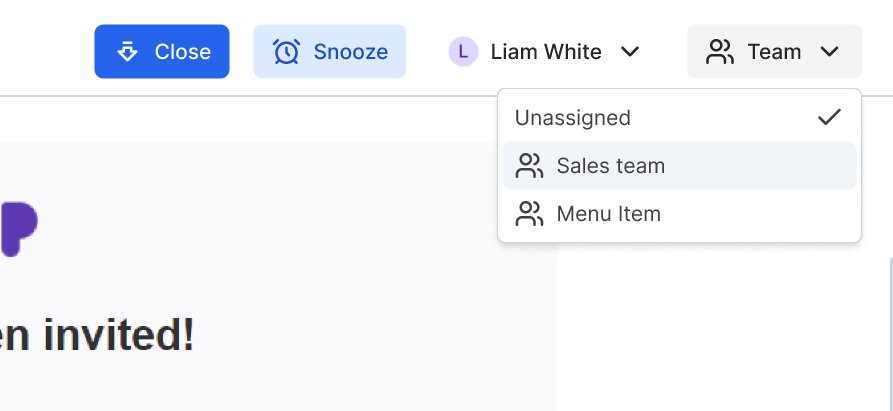
The Teams feature fundamentally transforms how conversations are assigned and managed within the Help Desk. You can effortlessly direct incoming messages to the most appropriate team using a dedicated Teams dropdown. This intelligent routing ensures that customer conversations are immediately placed in the hands of specialists. It will significantly reduce the response time and improving overall service quality. A conversation assigned to a specific team is automatically moved to that team's dedicated channel. As a result, it disappears from general unassigned queues and ensuring focused attention.
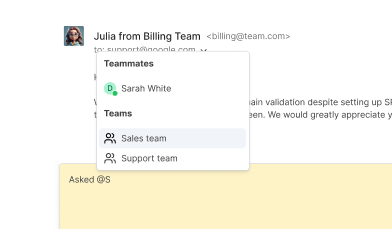
Furthermore, the power of collaboration is amplified through mentions. By simply typing '@' within a conversation or note, users can now mention not only individual teammates but entire teams. This capability instantly notifies all members of the mentioned team, directing their attention to critical discussions. It ensures that relevant team members are always in the loop, facilitating quicker problem-solving and a unified approach to customer support.
Conclusion - empowering your Help Desk with Teams
By introducing the Teams feature, Elastic Email Inbox Help Desk marks a significant step towards optimizing customer communication and internal collaboration. By providing intuitive tools for creating and managing specialized teams, businesses can now achieve organizational efficiency. This feature ensures that only the most qualified teams handles customer interactions. It leads to faster response time, high customer satisfaction, and a more harmonious working environment for your departments. Embrace the power of Teams and transform your Help Desk into a finely tuned engine of customer service excellence, where clarity, speed, and collaboration meet to deliver superior results.
Enjoying this Content?
You can receive articles like this straight to your inbox.
Sign up for our newsletter and get a dose of email marketing knowledge every month!
FAQ
If you like this article, share it with friends:


Ula Chwesiuk
Ula is a content creator at Elastic Email. She is passionate about marketing, creative writing and language learning. Outside of work, Ula likes to travel, try new recipes and go to concerts.


Eager to put this knowledge to some use?
Try one of our products!


