
Table of Contents
Elastic Email vs Mailchimp (2026): Features, Pricing, and Which One to Pick
When searching for an email marketing platform, you may feel overwhelmed by the number of options available. You search for the best or most popular ones, and you see the name that appears on most of the lists - Mailchimp. It’s a powerful email marketing service, but is it for everyone? Definitely not. Your email marketing tool should suit your needs. If you’re a small or mid-sized business owner or employee, a solopreneur, or a content creator, you don’t need the multitude of features you probably will never use, but pay for them. If you’re already a Mailchimp user, you have probably seen it yourself.
Table of Contents
- Elastic Email vs Mailchimp at a glance
- Pricing: Elastic Email vs. Mailchimp, plan by plan
- Email marketing features: editor, templates, monetization, support
- Transactional email, API, and SMTP
- How to migrate from Mailchimp to Elastic Email
- Elastic Email vs Mailchimp - which one to choose
- Frequently Asked Questions
Elastic Email and Mailchimp both cover the essentials of email marketing: a drag-and-drop editor, templates, segmentation, automation, and reporting. The difference is what you pay and what's gated. At 2,500 contacts, Elastic Email Starter costs $29/month with 37,500 sends; Mailchimp Essentials costs $75/month with 50,000 sends. Elastic Email includes multivariate testing, send-time optimization, and a transactional email API in every paid plan, whereas Mailchimp reserves them for the Standard and Premium plans, or sells them as add-ons. If you're wondering about Elastic Email vs Mailchimp, the answer is simple - if you want the lowest cost per send with 24/7 human support, choose Elastic Email. If you need Mailchimp's e-commerce reporting or SMS in one dashboard and the budget allows, Mailchimp still fits.
Elastic Email vs Mailchimp at a glance
| Elastic Email | Mailchimp | |
|---|---|---|
| Price per 2,500 contacts | Starter, $29/mo | Essentials, $75/mo |
| Monthly sends included | 15× contacts (37,500) | 20× contacts (50,000) on Essentials; 24× on Standard |
| Free plan | 1,000 contacts, 3,000 emails/mo | 250 contacts, 500 emails/mo |
| Multivariate testing | All paid plans | Standard and Premium only |
| Send-time optimization | All paid plans | Standard and Premium only |
| Marketing automation | 1 automation on Starter, unlimited on Pro | Up to 4 flow steps on Essentials; up to 200 flows on Standard+ |
| Transactional email (API/SMTP) | Included; standalone Email API from $19/mo for 50,000 emails | Separate paid add-on (Mailchimp Transactional); demo only on Essentials |
| Users / seats | User management and sub-accounts on Pro | 3 seats (Essentials), 5 (Standard), unlimited (Premium, $350/mo+) |
| Duplicate contacts | Counted once | Counted per audience |
| Monetization | Paid newsletters and checkouts (Pro) | Not available |
| SMS marketing | Not available | Paid add-on |
| Support | 24/7 email and live chat on every plan, including Free | 24/7 email and chat on paid plans; 30 days of email support on Free |
| Onboarding | Assisted onboarding | 1 session (Standard), 4 sessions (Premium) |
| Integrations | Native integrations plus REST API and SMTP relay | 300+ integrations |
Prices are standard monthly rates in USD as listed on each vendor's public pricing page on November 20, 2026, and are subject to change.
Pricing: Elastic Email vs. Mailchimp, plan by plan
Every expense matters, especially if you’re running a small or medium-sized business. That is why it’s supposedly one of the most important factors when choosing an email marketing tool. Elastic Email offers two paid plans for its Email Marketing product: Starter and Pro. Let’s focus on the first one. Prices start at $29/month for up to 2,500 contacts and 37,500 emails, and they scale gradually. In Mailchimp, the Essential plan for 2,500 contacts costs $75/month and includes 50,000 emails to send.
As for free options, both services offer them. Elastic Email has a free version where you can upload up to 1,000 contacts and send 3,000 emails/month (with a 100 emails/day limit). You get access to all the features available in the Starter plan. In Mailchimp's free plan, you can send 500 emails per month, but you can upload only 250 contacts, and the features available are limited.
| Contacts | Elastic Email Starter | Elastic Email Pro | Mailchimp Essentials | Mailchimp Standard | Mailchimp Premium |
|---|---|---|---|---|---|
| 2,500 | $29/mo | $49/mo | $75/mo | $100/mo | $350/mo |
| 5,000 | $59/mo | $79/mo | $110/mo | $135/mo | $350/mo |
| 10,000 | $89/mo | $119/mo | $180/mo | $230/mo | $465/mo |
| 50,000 | $319/mo | $399/mo | - | $630/mo | $900/mo |
Standard monthly prices in USD as listed on Mailchimp's and Elastic Email's public pricing pages on November 20, 2026 (Mailchimp: after any introductory discount ends). Prices are subject to change.
What the prices include
Every Elastic Email plan includes 15× your contact count in monthly sends: 37,500 emails at 2,500 contacts, 750,000 at 50,000. Mailchimp Essentials includes 10×, Standard 12×, and Premium 15×, with overage fees if you exceed either the contact or the send limit.
Elastic Email Starter vs Mailchimp Essentials
Elastic Email is 46% to 61% cheaper at 2,500 to 10,000 contacts ($29 vs $75, $59 vs $110, $89 vs $180), with more sends included. Mailchimp doesn't offer Essentials at 50,000 contacts; at that size, its entry plan is Standard at $630/month, against $319/month for Elastic Email Starter.
Elastic Email Pro vs Mailchimp Standard
Elastic Email Pro, which adds unlimited automations, user management, sub-accounts, webhooks, custom rDNS, and monetization tools, is 37% to 51% cheaper than Mailchimp Standard with more sends: $49 vs $100 at 2,500 contacts, $119 vs $230 at 10,000, and $399 vs $630 at 50,000.
Elastic Email Pro vs Mailchimp Premium
If the feature you need is team access (multiple users, role management, sub-accounts), Mailchimp requires Premium at $350/month regardless of list size and rises to $900/month at 50,000 contacts. Elastic Email Pro covers that at $49/month for 2,500 contacts and $399/month at 50,000, 56% to 86% less.
Free plans
Elastic Email's free plan allows 1,000 contacts and 3,000 emails per month (100 per day) with the Starter feature set. 24/7 email and chat support is available without any limits. Mailchimp's free plan allows 250 contacts and 500 emails per month, with email support for the first 30 days only.
How contacts are counted
Elastic Email counts a duplicate address once across your lists. Mailchimp counts a contact in each audience it belongs to, so the same person in two audiences uses two contact slots and can push you into the next price tier.
Email marketing features: editor, templates, monetization, support
On day-to-day campaign work, the two platforms are closer than their price tags suggest. Both offer a drag-and-drop editor, a library of 100+ responsive templates, custom HTML import, contact lists and segments, signup forms, landing pages, scheduling, and real-time reporting on opens, clicks, bounces, and unsubscribes. As mentioned earlier, a few crucial elements make an email marketing service a great option for smaller businesses or solopreneurs. You need to easily upload and manage your contacts in lists and segments, which you can do in both Elastic Email and Mailchimp. Both platforms feature user-friendly interfaces and great email deliverability. But what makes Elastic Email a great Mailchimp alternative?
Useful campaign management tools
During campaign creation, some tools take your email sending to a whole different level. Multivariate testing is one of them. Comparing only two options, like in A/B tests, is sometimes simply not enough. When you are considering several options for the subject line, email layout, or any other element, you want to know that the choice you make is the best one. That is why we offer multivariate testing already in the Starter plan, and you can test up to seven different email versions. Mailchimp, in turn, doesn’t offer this feature in the Essentials plan, only in Standard and Premium.
The same applies to send time optimization. For better email delivery, we give you the option to optimize your sending. If you toggle this option, you can either send your emails to the most engaged contacts first or send them at each contact's optimal open time within the next 24 hours, based on their previous engagement. This feature is available in both Email Marketing Starter and Pro plans, whereas Mailchimp offers it only in the Standard and Premium plans, not Essentials.
Testing
Elastic Email includes multivariate testing with up to seven versions of a campaign on Starter and Pro. A classic A/B test with two subject lines tells you which of two options performs better, but it rarely tells you why. When you're weighing several subject lines, two layouts, and a couple of calls to action at once, you need more variants in a single test. Elastic Email lets you set that up in the campaign creator, send each version to a sample of your list, and automatically roll out the winner. Mailchimp offers A/B and multivariate testing only on Standard and Premium; Essentials users get neither, which means the cheapest plan with any testing costs $100/month at 2,500 contacts, versus $29/month on Elastic Email Starter.
Monetization tools - Paid newsletters and Checkouts
Features like Checkouts and Paid Newsletters are unique capabilities in the Elastic Email offer, enabling you to earn money from your valuable content. Checkouts enable you to sell digital (and physical) products through our platform. Whether you’re selling ebooks, audiobooks, online courses, stock photos, presets, templates, music tracks, digital art, software, or any other digital product, you can use Elastic Email to sell it. You can create the entire checkout flow - your product page, payment and confirmation page, and post-purchase email. You can even create an entire shop with all your products by combining the checkouts feature and landing page creator.
Paid Newsletters is a new feature in the Elastic Email offer that lets you sell subscriptions to your premium content. You can easily create the entire flow - from choosing and customizing a landing page template showcasing your exclusive newsletters, through confirmation page design, paid newsletter link customization, to social share preview and post-purchase settings. This feature takes your newsletter sending to the next level.
Both of these features are available in the Email Marketing product. In free versions of these products and the Email Marketing Starter plan, you can create the entire flow, but you cannot publish it. You can publish and start selling once you upgrade to the Pro plan. To enable payments for your content in both Checkouts and Paid Newsletters, connect your Elastic Email account to Stripe. Then, your earnings will be processed automatically and securely, in one of seven currencies you can choose from. Also, you don’t need your own domain to create your product pages. Everything will be created within the myelasticemail.com domain, which you can customize by adding a prefix and a suffix after “/”, e.g., brandname.myelasticemail.com/ebook.
Templates and AI features
Mailchimp's generative AI features (copy and layout suggestions) are included on Standard and Premium and not on Essentials. Elastic Email's AI Template Designer, which rewrites copy, adjusts layouts, and changes colors from a prompt, is available in the editor on all plans. Mailchimp lets Essentials users create custom-coded templates but requires an upgrade to send them.
Excellent 24/7 human support - for free
We are known for our outstanding customer service team, who will assist you from day one, for free! We have a team of specialized customer support agents available for you 24/7 via email or live chat. And it’s not only our opinion that our customer support team is top-notch. See our customers’ feedback:
They have good supportive customer service. They respond quickly and resolve the issue or doubt very quickly.ustomer support. - GalenX
Easy to use, reliable and impeccable customer support. Faultless. - Yogi
The customer service is amazing, they respond within minutes even after the jet, all the executives are helpful and they make sure your issue is resolved quickly- Parag N
As for Mailchimp, they offer email support for the first 30 days in the free plan and 24/7 email & chat support on higher plans, which can be problematic, especially when you’re just starting out and you need more assistance. Also, according to Mailchimp customer reviews, their customer service seems inconsistent. Some people find it very helpful, but others complain about slow responses, a lack of assistance, and customer support being “non-existent".
Transactional email, API, and SMTP
This is the clearest structural difference between the two products.
Businesses mostly need more than just marketing emails. If you need to send confirmation emails, welcome emails, order and shipping confirmations, invoices and purchase receipts, payment reminders, password recovery, cart abandonment emails, or security alerts, those are all transactional emails. This means they are messages triggered by an action your customer or subscriber takes and sent automatically.
Elastic Email was built as a sending platform first. A REST API and SMTP relay are part of every Email Marketing plan, so all the transactional emails mentioned above go out from the same account as your newsletters. If you only need transactional sending, the standalone Email API product starts at $19/month for 50,000 emails (Pro at $49/month adds inbound processing, webhooks, sub-accounts, and custom rDNS), with a free tier of 3,000 emails per month.
Mailchimp handles transactional email through Mailchimp Transactional (formerly Mandrill), a separate product billed on top of a Standard or Premium marketing plan. Essentials users get a demo only. That means a store sending both campaigns and receipts on Mailchimp pays for two products and manages two dashboards.
For developers, both expose documented APIs and official SDKs. Elastic Email's API covers contacts, campaigns, templates, suppressions, verification, and sending in one surface; Mailchimp's Marketing API and Transactional API are separate, with separate keys and rate limits.
How to migrate from Mailchimp to Elastic Email
When you decide to switch from Mailchimp to Elastic Email, we imagine there are some crucial aspects to ensure a smooth transition. If you need an email service provider to send, for example, a newsletter to your subscribers, these crucial aspects may include migrating your contact list and importing email templates.
Migrate your contact list
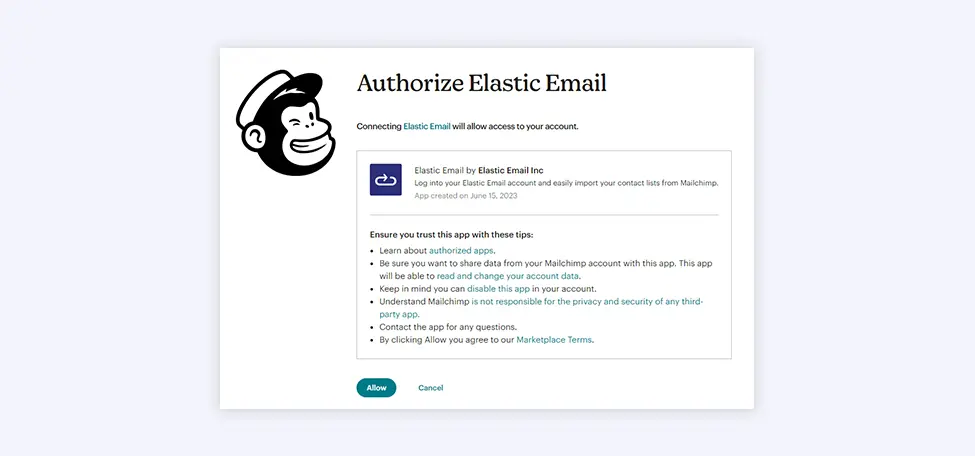
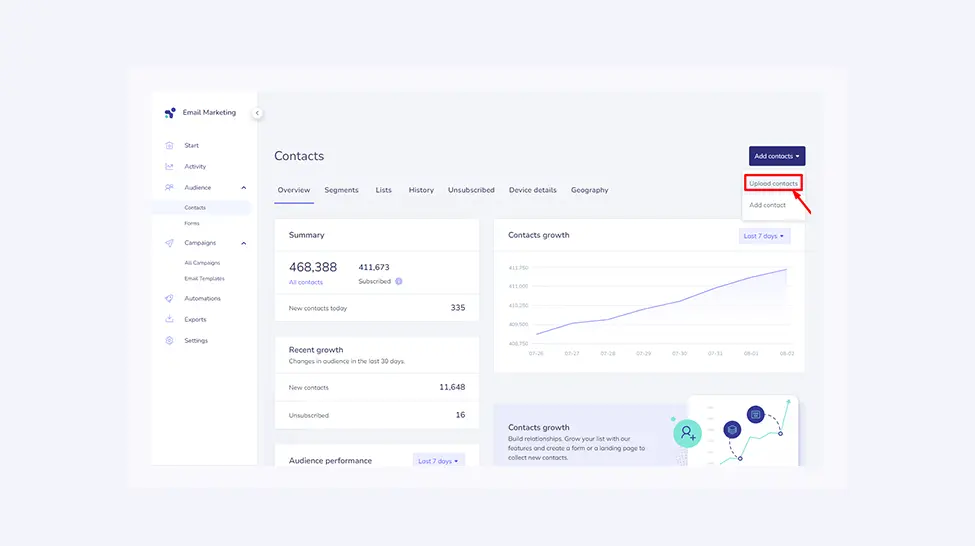
To migrate your contact list from Mailchimp, you can do so automatically or manually. In the first option, go to Audience, then Contacts, and select Add Contacts on the Elastic Email dashboard. Choose Upload contacts, confirm the terms, and choose how you’ll upload your contacts. Select “Import from Mailchimp” and grant all necessary permissions in your Mailchimp account to authorize Elastic Email. Confirm all possible custom fields and assign the imported contacts to existing or new contact lists.
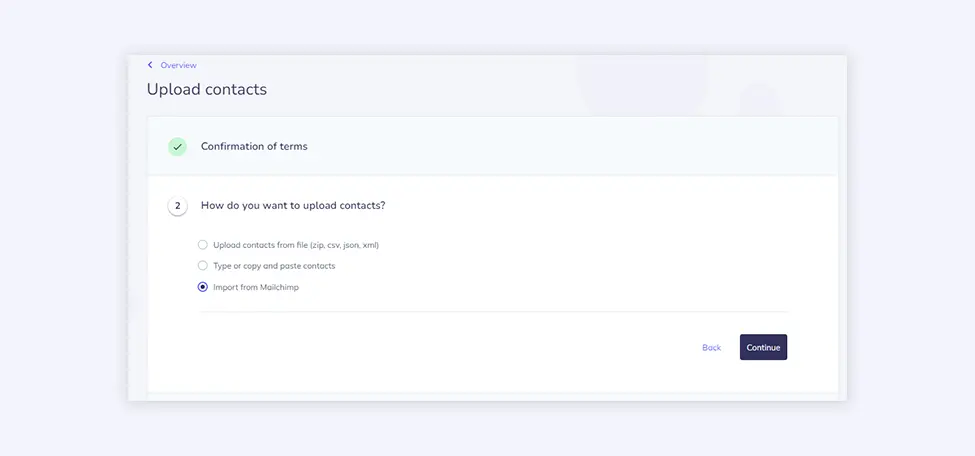
If you choose manual migration, export your contacts to a CSV file and upload it to your Elastic Email account. To do it, go to Audience, then Contacts, and click Add Contacts on the Elastic Email dashboard. Choose Upload contacts, confirm the terms, and choose how you’ll upload your contacts.
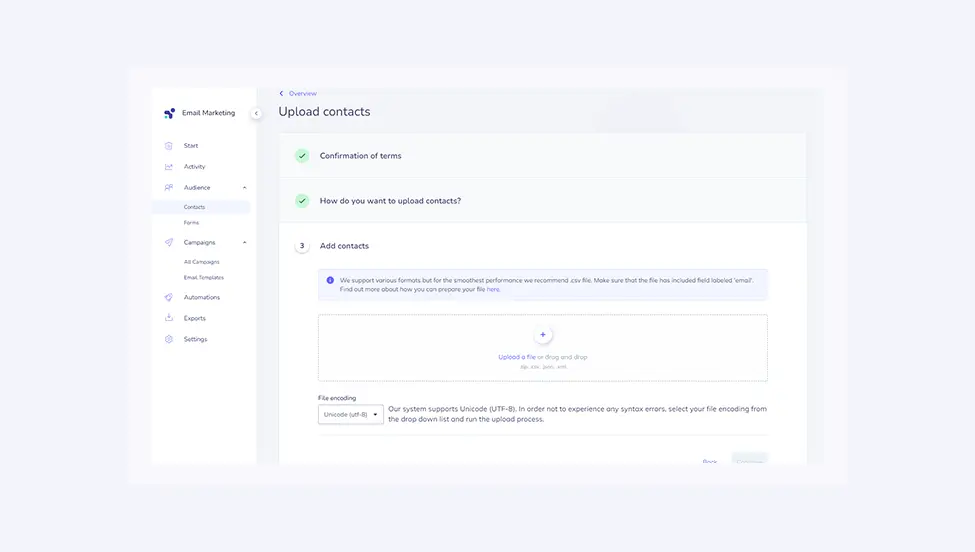
At a minimum, your .csv file has to include a column of email addresses. If you have more contact values, they should be separated by a comma in the order email, firstname, lastname. Make sure the file exported from Mailchimp has the same structure to ensure a seamless contact upload. Also, make sure there is exactly one field labeled ‘email’. If everything is correct, the contacts are automatically imported and assigned to a list, and you can continue sending your email campaigns.
Migrate your email templates
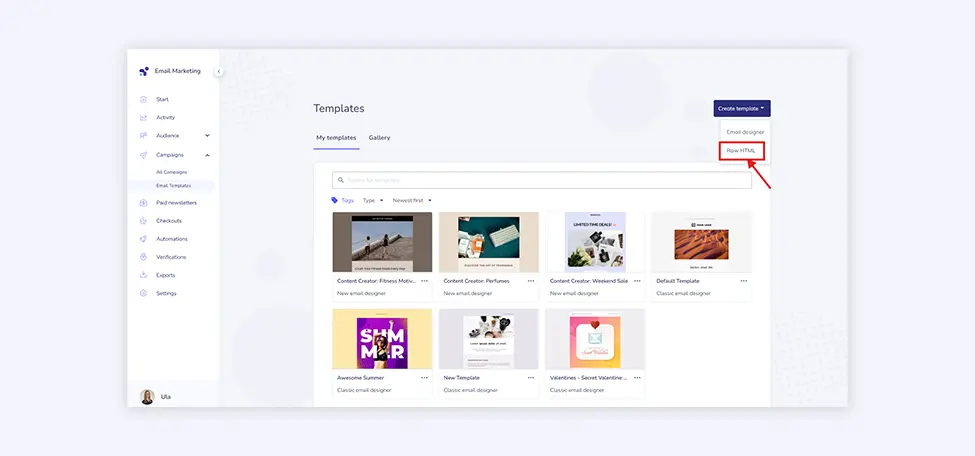
If you have your favorite email templates in your Mailchimp account, you can easily export them as HTML and migrate them to Elastic Email and our RAW HTML editor with no hassle. Once you have your template exported from Mailchimp, log in to your Elastic Email account, click Email Templates > Create template, and choose Raw HTML. Then paste the HTML code into our template editor and customize it if needed. The template will be ready to use.
Elastic Email vs Mailchimp - which one to choose
Choose Elastic Email if you
- send more than 10 emails per contact per month, or expect to grow your list and want pricing that scales gently
- need transactional email (API or SMTP) alongside campaigns without paying for a second product
- want multivariate testing and send-time optimization without upgrading to a $60+ plan
- run a team and need multiple users or sub-accounts without a $350/month Premium plan
- want 24/7 human support included, even on the free plan
- plan to sell paid newsletters or products directly from your email platform.
Choose Mailchimp if you
- rely on a specific integration that only Mailchimp offers natively
- run an e-commerce store and want Mailchimp's revenue attribution and product-recommendation automations
- need SMS marketing, a website builder, and email in one dashboard, and your budget allows it.
If you're already on Mailchimp, Intuit's November 2026 agreement to sell Mailchimp to Bending Spoons means the next year is a reasonable time to evaluate alternatives before any pricing or support changes take effect.
Enjoying this Content?
You can receive articles like this straight to your inbox.
Sign up for our newsletter and get a dose of email marketing knowledge every month!
Frequently Asked Questions
If you like this article, share it with friends:


Anna
A marketing minded individual with a heart for a deeper story. Spent more than a decade in marketing, most of it SaaS, and now leads the team behind Elastic Email. Off the clock, watches old movies, makes great food and keeps a finger on the pulse for lifestyle and marketing trends.



Eager to put this knowledge to some use?
Try one of our products!


