
Table of Contents
Elastic Email: a Great MailerLite Alternative
With so many email marketing platforms available on the market, choosing the best one for you is quite a challenge. The most crucial thing is to find the one that fits your business needs, is scalable and powerful, but also intuitive, user-friendly and AI-powered. We’re here to prove to you that Elastic Email is the perfect choice for you. You may consider other solutions, like MailerLite, but let us show you all the reasons why Elastic Email is a great MailerLite alternative.
Table of Contents
- TL;DR - Elastic Email vs. MailerLite
- AI Template Designer
- Connect via API or SMTP relay - everything in one product
- HTML raw editor
- Email Verification Service to validate your list
- 24/7 live chat support to assist you every step of the way
- Elastic Email vs. MailerLite - features comparison
- How to migrate to Elastic Email from MailerLite
- Why Elastic Email is a great MailerLite alternative - wrapping up
- FAQ
TL;DR - Elastic Email vs. MailerLite
Elastic Email offers an AI Template Designer on all plans (unlike MailerLite's writing-assistant-only AI), built-in API/SMTP access without needing a separate product (MailerLite requires a paid MailerSend subscription for this), a free raw HTML editor on every plan, a built-in email verification service (MailerLite requires a separate Mailercheck subscription), and 24/7 email and live chat support from the start. Migrating your contacts from MailerLite is a straightforward CSV export-and-import process.
AI Template Designer
Artificial intelligence has become a permanent element of our lives, and there’s no doubt about it. So why not take advantage of it and optimize your daily tasks, including email marketing? Let’s work smarter, not harder, and longer. That’s why, in Elastic Email, we released AI Template Designer - your personal AI-powered assistant to make your email templates even better.
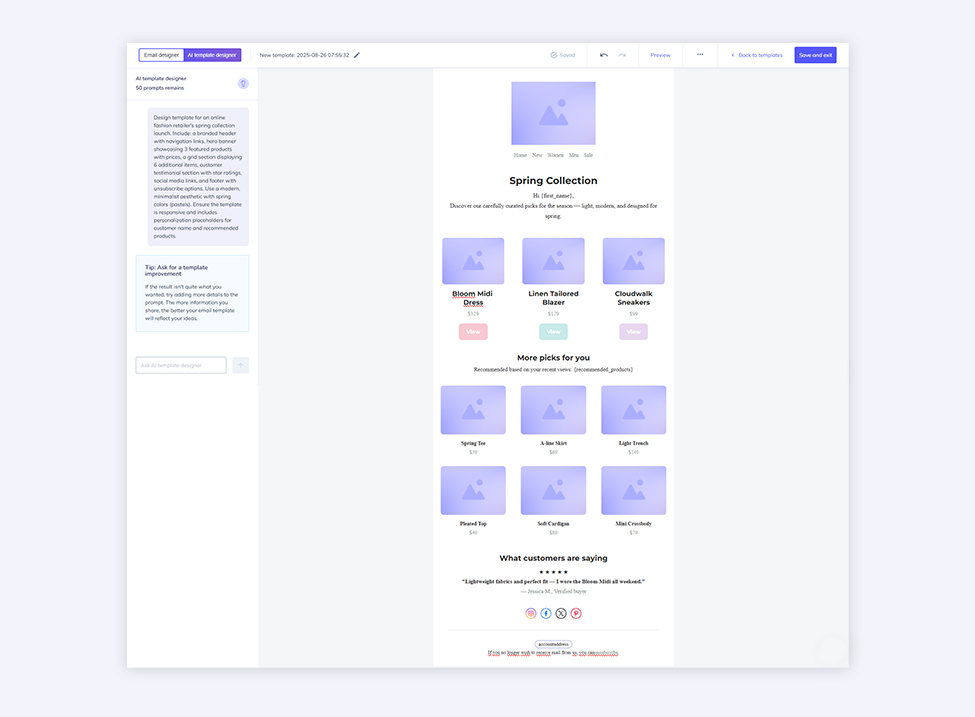
AI Template Designer can help you improve your email template by rewriting your copy, adjusting layouts, changing colors, images, and more. You just ask the tool what you want to change or generate until the template meets your needs. It’s a comprehensive tool that helps you improve your email templates in seconds. Say goodbye to time-consuming edits you used to have to do manually. And the best part is that AI Template Designer is available in both Starter and Pro plans, with 40 prompts/month and 100 prompts/month, respectively. MailerLite also offers an AI-powered solution, but it’s only a writing assistant to generate texts. Besides, it’s only available in their most expensive plan - Advanced.
Connect via API or SMTP relay - everything in one product
Your email sending needs can be diverse, and apart from creating your email template and sending campaigns in our interface, you may also want to send emails directly from your online store, third-party tools, or app.
That’s why we meet your needs and give you this opportunity. Even though we have Email API as a dedicated product to send email via Email API or SMTP relay and create your own email infrastructure, we also give access to these solutions in the Email Marketing product. You can use HTTP API or SMTP to integrate Elastic Email with external tools and send both marketing and transactional emails directly from them. If you want to send an email via API using MailerLite, you need to buy their other product, MailerSend.
Of course, it generates additional costs. Let us break it down to you. With Elastic Email, you get 2,500 contacts and 37,500 emails monthly for $29. MailerLite costs $33/month for 2,500 contacts. Sending via API or SMTP relay requires a MailerSend plan from $35/month. In total, it’s going to cost you $68, compared to $29 in Elastic Email.
HTML raw editor
Sometimes, to create an email template, you don’t need a drag-and-drop editor but a simple HTML editor. We respond to your expectations, so we offer both template designers in our app, in every plan, even the free version. You can create your email template from scratch in our RAW HTML editor. MailerLite also offers a custom HTML newsletter editor, but it’s only available in their most expensive plan, which can be problematic if you’re on a tight budget.
Email Verification Service to validate your list
In pursuit of the highest possible deliverability, an email address verification tool is essential. With our Email Verification Service, you can validate your email addresses and optimize your email list by getting rid of old or invalid contacts. Why is it so important to you? Fresh and verified lists translate into fewer email bounces and improve sending performance. The tool also eliminates spam traps, role addresses, and possible typos and misspellings. You can validate single contacts or check them in bulk, everything within your plan. MailerLite doesn’t offer an email validation service in its email marketing products. There’s a sister company, Mailercheck, that you can use to verify your email addresses, but it’s a separate tool, with separate pricing.
24/7 live chat support to assist you every step of the way
Customers’ satisfaction is our top priority, and one of the components of this goal is providing the highest level of customer service possible. We’re particularly proud of our customer support team, who is there for you for free from the moment you create your Elastic Email account. You can reach out to our customer service agents 24/7 via email and live chat to get the needed assistance. As our customers’ opinions speak for themselves. Just check our profile on Trustpilot or G2. As for MailerLite, they only offer email support in the Growing Business plan. Live chat support is available only in the Advanced plan.
Elastic Email vs. MailerLite - features comparison
Plan comparison |  |  |
Contact Management and Segmentation | 
| |
Landing Pages |
| |
Signup Forms |
| |
Email Campaign Creator |
| |
Drag-and-drop Email Designer |
| |
HTML Editor |
| |
Email Template Gallery |
| |
AI Template Designer |
| |
A/B Testing |
| |
Access to API |
| |
Access to SMTP Relay |
| |
Campaign Reporting |
| |
Click Maps |
| |
Monetization Features |
| |
Email Verification Service |
| |
Customer Support | 24/7 Email Support | 24/7 Email & Live Chat Support |
How to migrate to Elastic Email from MailerLite
If you’ve decided to move from MailerLite to Elastic Email, congratulations! Now, let’s make your transition process as smooth as possible. We know there are a few things that may be particularly crucial for you when switching platforms, and migrating your contacts is one of them.
Migrating your contact list
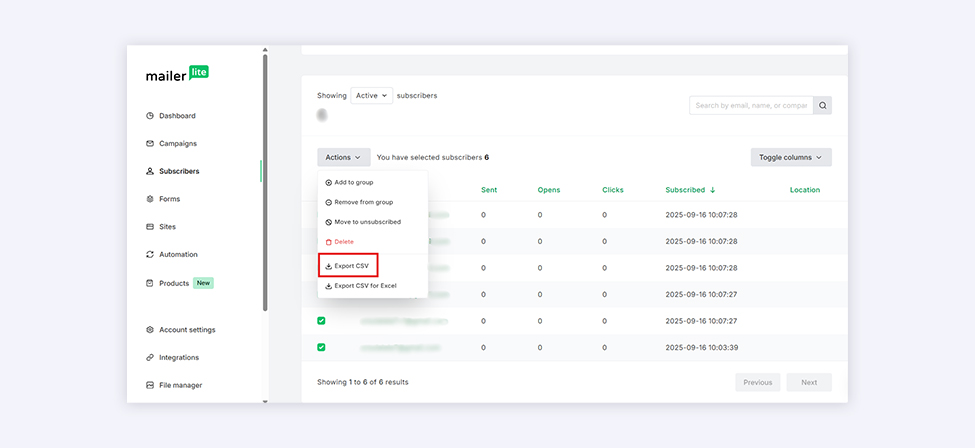
To import your email list(s) to your newly created Elastic Email account, you first need to export your contacts from your MailerLite account. You need to log in to their dashboard and choose Subscribers from the main navigational menu. You can select all contacts or particular groups (lists), and once you select the contacts you want to export, click Actions, and Export CSV in the dropdown menu.
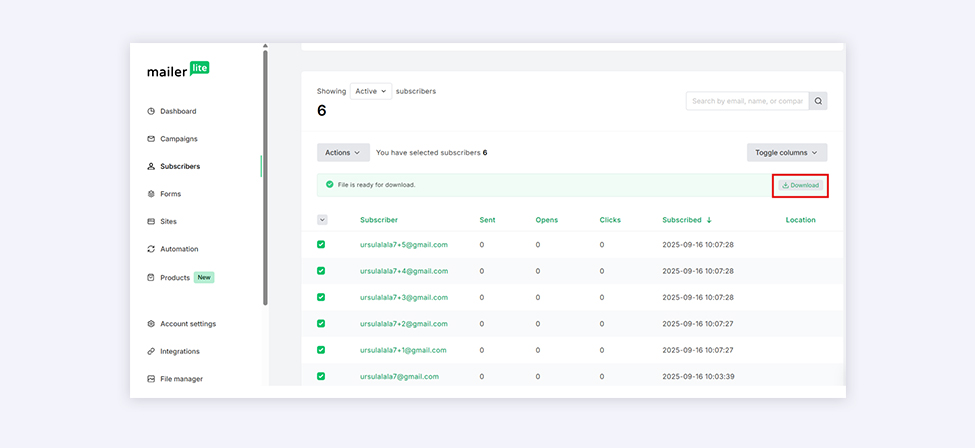
Once your file is ready to be downloaded, you can click Download.
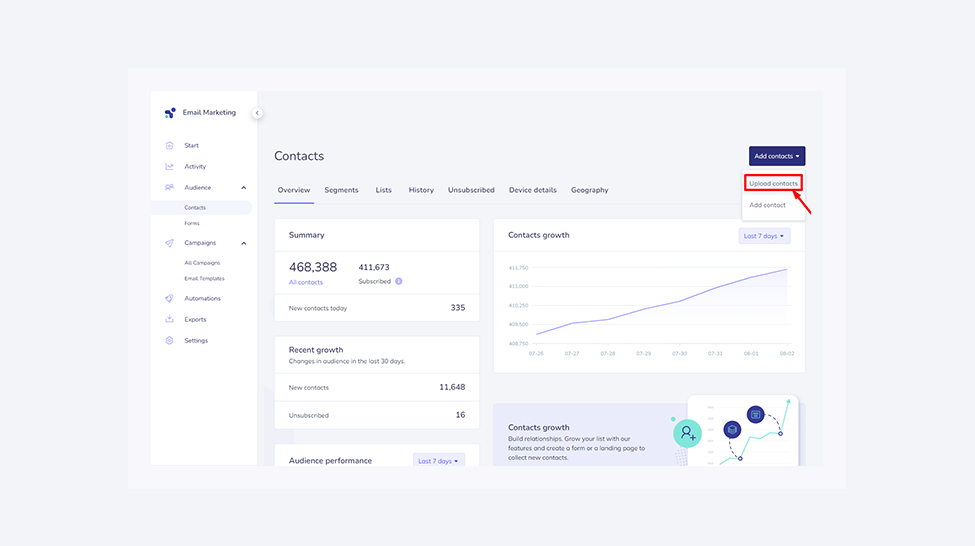
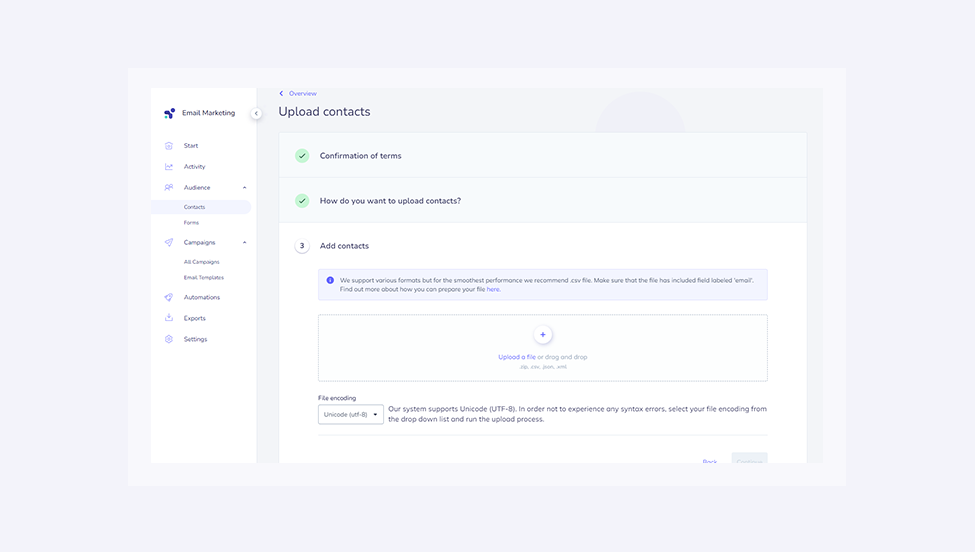
Then, on the Elastic Email dashboard, you go to Audience>Contacts>Add contacts. In this case, you have to choose Upload contacts, confirm the terms, and choose how to upload your contacts.
You can then upload your file. We support various formats, but we strongly recommend using a CSV file. At a minimum, the .csv file can simply be a column of email addresses. If you have more contact values, they should be separated by a comma in the order email, firstname, lastname. Also, make sure there is exactly one field labeled ‘email’. Here’s an example of such a .cvs file. The system will show you how many contacts it recognized and the additional attributes to confirm. The migration process is completed after verifying and assigning contacts to a list of your choice.
Why Elastic Email is a great MailerLite alternative - wrapping up
Ready to make the switch to Elastic Email? We hope we showed you all the reasons why Elastic Email is a great MailerLite alternative. From an AI-powered email template designer, through a raw HTML editor and access to email API and SMTP, to email verification service and reliable 24/7 customer support, Elastic Email is your new go-to email marketing platform that scales as your business grows.
Enjoying this Content?
You can receive articles like this straight to your inbox.
Sign up for our newsletter and get a dose of email marketing knowledge every month!
FAQ
If you like this article, share it with friends:


Ula Chwesiuk
Ula is a content creator at Elastic Email. She is passionate about marketing, creative writing and language learning. Outside of work, Ula likes to travel, try new recipes and go to concerts.




Eager to put this knowledge to some use?
Try one of our products!


