
Table of Contents
Email Deliverability – Its Role, What Affects It and Best Practices
Every business relies on emails to nurture leads, promote campaigns, and drive sales. Truth be told, sending emails to users is more than just communication. It is a channel for fostering trust and elevating brand value through consistency.
Table of Contents
The scope of email marketing is so enormous that global revenue is projected to be $17.9 billion by 2027. No wonder every marketer wants to leverage it to achieve their goals and craft a resonating profile with the audience.
Email marketing trends help in optimizing campaigns for better deliverability and engagement. However, have you ever wondered if all your recipients receive the emails you send in their priority inbox? The answer is no! That’s because when emails are handled without an appropriate strategy, they land in the spam box or get bounced. This is where email deliverability comes to the forefront.
It is the rate at which emails sent from the server get positioned in the priority inboxes. Therefore, ignoring it will put you in a difficult position, causing all your marketing strategies to fail. Here, we have illustrated the importance of email deliverability for your business success and what can affect it. We will also present you the best practices to ensure high email deliverability rate.
TL;DR
Email deliverability is whether your messages reach the inbox rather than the spam folder, and since 2024 it is governed by published rules, not guesswork. Gmail, Yahoo and Microsoft all now set explicit requirements for anyone sending in volume, and failing them means junk placement or outright rejection regardless of how good your content is.
If you send 5,000 or more messages a day to consumer mailboxes, you must:
- Authenticate with SPF, DKIM and DMARC - DMARC at minimum
p=none, with the From domain aligned to either SPF or DKIM. Microsoft has rejected non-compliant mail to outlook.com, hotmail.com and live.com since 5 May 2025. - Offer one-click unsubscribe (RFC 8058) and process requests within two days.
- Keep your spam complaint rate below 0.3%, and ideally under 0.1%.
- Get the infrastructure right - valid forward and reverse DNS on your sending IPs, TLS for transmission, and RFC 5322-compliant headers.
Everything else - list hygiene, sending consistency, content quality, IP warm-up - still matters, but it matters on top of these requirements rather than instead of them. Send fewer than 5,000 a day and you need at least SPF or DKIM, though meeting the full list is the safer position as thresholds tighten.
Role of Email Authentication
Every email service provider or ESP tool scans emails and sends them to dedicated recipients. Since ESPs handle incoming emails, you must pay special attention to authentication and security if you want to achieve the target of higher email deliverability. After all, unauthenticated emails are usually classified as fraudulent or phishing emails and placed in the spam folder.
To further understand the importance of email verification for deliverability, read below.
- Builds trust and brand reputation
Cyber crimes have skyrocketed today, and customers always remain on edge regarding the emails they receive in their mailboxes. If any email looks suspicious, the click-through and open rate take a damaging blow, thereby reducing the deliverability.
So, authenticating emails before hitting the send button is crucial if you want them to be placed in the recipient's inbox right away. This way, the ESP software program will leverage the trustworthiness of the authentication program, thereby increasing the likelihood of proper email placement.
- Prevents spams
Unauthenticated emails mainly raise a red flag for ESP programs, increasing the probability of being marked as spam. The worst-case scenario is that the emails are blocked from entering the recipient's server. To avoid your email being deduced as spam, it is best to use email content optimization with the authentication system and secure it before sending it to the recipients.
- Boosts customer confidence
Authenticated emails quickly boost confidence among your customers. Knowing that their data will be protected and that the content present in the email comes from a legitimate source - especially when combined with safe browsing tools like a Virtual Private Network - taking action will become easier for them.
That’s why they won’t mark the email address as spam, which will automatically help drive the deliverability and customer retention rate higher.
Factors Affecting Email Deliverability
Numerous variables must be considered while assessing today's digital ecosystem's email deliverability rate. Considering them beforehand will give you an upper hand in optimizing the action strategies and proper implementation.
- The sender score rated by the ISP plays a crucial role in determining the email's deliverability. A higher score is likely to increase this rate, while a lower score might cause the email to be dismissed as spam or fraud.
- Email content optimization is one of the crucial factors affecting its deliverability rate. For instance, a compelling subject line increases the sender's credibility and guarantees a higher opening rate.
- Emails sent out irregularly will likely be re-routed to the spam folder. Therefore, marketers need to plan the schedule appropriately so that the emails are positioned in the correct folder to ensure higher opening and click-through rates.
Best Practices for Improving Email Deliverability
Following best practices to increase email engagement is essential to boosting any business's revenue and reaching the right audience. So, here are some best practices for you to help you improve your email deliverability:
Use authenticated email domains
A study from Deloitte proved that 91% of cybercrimes have phishing emails as the source. Therefore, verifying your email domain and using an authenticated one is an absolute priority. This is essential to protecting you from identity theft and other cyberattacks that are commonly done via email.
Most businesses leverage Domain Keys Identified Mail (DKIM) or Sender Policy Framework (SPF) to prevent becoming victims of email spoofing and falsified personification. Once you authenticate the email domains using these top-notch methods, the ISPs will consider the emails credible enough to send them to the recipient's server.
Maintain appropriate IP allocation
A study in 2023 revealed that approximately 14.3% of emails are marked as spam automatically and go missing from the recipient's inbox folder. The best way to avoid this event from occurring is by using a dedicated IP address.
When you stop using shared IP and instead focus on a dedicated or private one, your emails will have higher credibility and security regarding the ISP rating. As a result, the deliverability rate is also likely to increase tenfold.
Curate non-spammy subject lines
Another way to avoid your emails being overlooked or marked as spam is by curating a compelling and actionable subject line. According to a study, about 69% of recipients mark emails as spam because the subject lines are not genuine or look AI-generated.
That’s why you must ensure the subject lines don't have any typical spam or catchphrases, such as risk-free or eliminating your debt. If these are present, ISPs will automatically mark the emails as spam, and the deliverability rate will be significantly reduced.
Future Trends in Email Content and Deliverability
Businesses that adapt to future trends will be better positioned to reach their target audience. Here are a few trends you can follow for better email deliverability.
Focus on email engagement metrics
Marketers will curate strategies backed by email engagement metrics to drive the deliverability rate higher.
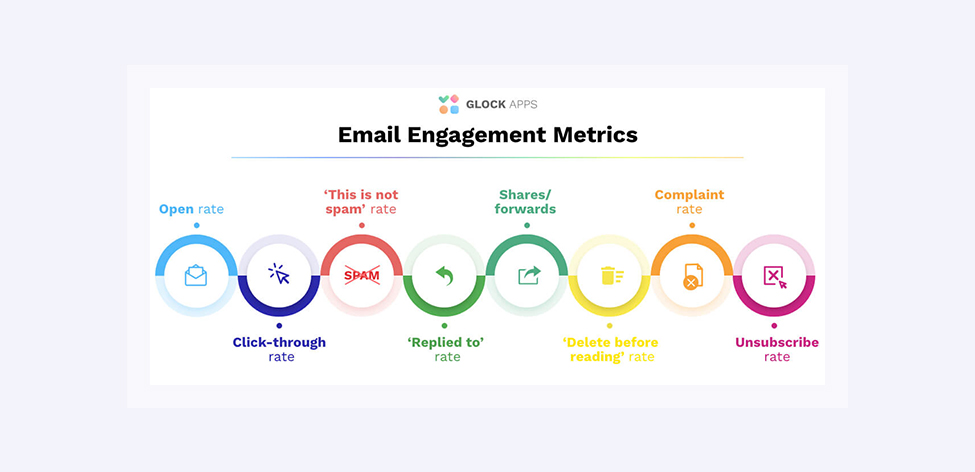
For instance, they will pay more attention to the click-through rates, email sharing rates, and spam complaints before structuring the emails, adding the subject lines, or choosing the recipients.
Use of artificial intelligence
AI and machine learning models will play a significant role in email deliverability. AI-based models will help streamline email deliverability by analyzing big data and providing in-depth reports on recipient behavior.
They will also assist marketers in predicting the optimal time for sending emails so that they don’t end up in the spam folder or get blocked by ESPs.
Conclusion
Many businesses confuse deliverability with delivery, so their strategies fail to yield generous results. Therefore, if you want the email marketing campaign to be successful, ensure the practices you adopt can put the emails in the recipient's box and not any other folder. Whether using email APIs or investing in email content optimization, the practices adopted will determine your emails' click-through and opening rates.
Enjoying this Content?
You can receive articles like this straight to your inbox.
Sign up for our newsletter and get a dose of email marketing knowledge every month!
FAQ
If you like this article, share it with friends:


Elastic Email

Eager to put this knowledge to some use?
Try one of our products!


