
Table of Contents
5 Elastic Email Inbox Use Cases: How to Unify Your Team and Customer Communication
Using multiple tools for internal and external business communication can be not only expensive but also a silent killer of productivity and customer satisfaction. Teams often use separate tools for internal chat, such as Slack or Teams, website live chat (e.g., Intercom or Tawk.to), and email-based customer support (e.g., Zendesk or Freshdesk). Such an approach requires multiple subscriptions, complex integrations, and leads to lost context, slower response times, and a chaotic customer experience. Elastic Email Inbox solves this critical challenge by providing a single, unified platform that brings internal teams and customers onto the same page, effortlessly and affordably. This article aims to present you with 5 Elastic Email Inbox use cases on how to unify your business communication.
Table of Contents
TL;DR - Elastic Email Inbox at a glance
What is Elastic Email Inbox?
Elastic Email Inbox is an all-in-one communication platform combining three tools under one subcription. It includes Team Chat, Live Chat, and Help Desk. In short, it replaces the need for separate tools like Slack, Intercom, and Zendesk, eliminating integration costs and context switching.
The three tools:
- Team Chat - internal messaging with channels, direct messages, media sharing, and search.
- Live Chat - a website chat widget for real-time visitor conversations, with user identification and custom branding.
- Help Desk - a shared inbox for managing customer support emails, with conversation assignment, status tracking, and internal notes.
Pricing: All three tools are available on a free tier with 90-day message history. For unlimited history, plans start at $9/seat/month.
Persona | Scenario | Tools used |
Sarah - e-commerce sales associate | Reducing cart abandonment in real time | Live Chat + Help Desk |
Mark - SaaS customer success lead | Resolving bugs with cross-team collaboration | Help Desk + Team Chat |
Lisa - remote marketing project manager | Keeping a distributed team aligned | Team Chat |
David - B2B sales representative | Qualifying and converting website leads | Live Chat + Team Chat |
Elena - small business owner | Managing all customer communication solo | Help Desk + Live Chat |
Why choose Elastic Email Inbox
Unlike competitors that force you to pay for and integrate other services, Elastic Email Inbox offers its three core tools. Team Chat, Live Chat, and Help Desk are included under one simple and affordable subscription. And the best part is you can use it for free, as we offer a very generous free tier. You can use all the tools without any limitations, but with a 90-day message and file history. Should you want to make it unlimited, you just need to upgrade your plan to $9/seat/month.
Having all the communication tools under one roof is not just convenient, but it’s a strategic advantage. Ensuring that every conversation is connected and every team member has the full context they need. Let’s take a look in more detail at each of the Elastic Email Inbox tools.
Elastic Email Inbox tools - Team Chat, Live Chat, and Help Desk
Elastic Email Inbox is a powerful, all-in-one communication suite built on three seamlessly integrated products. Specifically, each is designed to optimize a critical aspect of business communication.
Team Chat
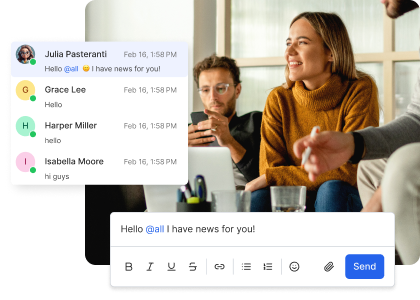
Team Chat is the dedicated internal communication hub for your organization. First and foremost, it eliminates the need for separate chat applications. It provides a secure and centralized space for team discussions. You can send instant messages, create private and public channels, and share media. In addition, you can get instant message notifications and use a search function to retrieve past conversations and files quickly. As a result, your teams are always aligned and can collaborate in real time without losing context.
Live Chat
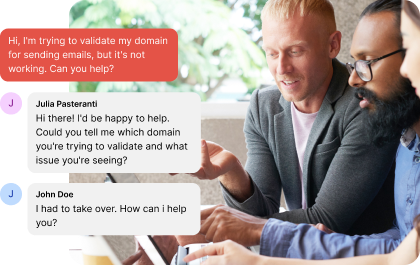
Live Chat is a customer chat widget that can be added directly to your website. It allows visitors to reach out instantly, turning curiosity into conversion. Specifically, it answers questions the moment they arise. Key features include user identification, custom branding, and a setup time of just minutes. Furthermore, Live Chat is a critical tool for sales. It reduces cart abandonment and provides instant support when a potential customer needs it most.
Help Desk
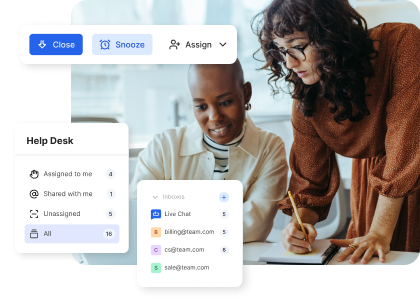
Help Desk is a shared inbox that centralizes all incoming customer emails and messages. As a result, no request is ever lost. It transforms a chaotic support email address into an organized, collaborative workspace. First, you can easily connect Help Desk with your existing email inbox. When a message arrives, assign it to a specific team member to avoid double-handling. Additionally, change the conversation status to open, snoozed, or closed. You can also collaborate in real time with colleagues via internal notes invisible to the customer. Altogether, it provides a unified view of every customer interaction.
You can also use Help Desk as a shared email inbox hub to integrate all your inboxes so that you can gather and respond to your emails in one place.
The Elastic Email Inbox Use Cases
Let’s now take a look at some exemplary Elastic Email Inbox use cases of how growing businesses can use and benefit from such a unified communication tool.
Sarah - reducing cart abandonment with Live Chat
Sarah is a sales associate at an online store selling sustainable home goods. Her primary goal is to reduce cart abandonment and convert hesitant shoppers. Her company decides to use Elastic Email Inbox and embeds the Live Chat widget on its product pages and checkout page. This way, when a customer pauses on the checkout page and hesitates, they can reach out to Sarah via Live Chat and ask about any doubts, e.g., about shipping and returns. This real-time interaction resolves uncertainties and may lead to an immediate purchase.
On Sarah's side, she sees and replies to all Live Chat conversations directly in Help Desk. Furthermore, Sarah and her team can view the full conversation history, ensuring a seamless support experience. Each team member has a seat - a separate user slot that is easily managed. Finally, the conversation ownership feature ensures that once Sarah assigns a conversation to herself, no other agent accidentally double-replies, preventing confusion.
Outcome: As a result, Sarah's team can resolve purchase hesitations in real time, directly at the moment of highest buyer intent. The combination of Live Chat for instant customer contact and Help Desk for organized conversation management means no query goes unanswered and no agent accidentally double-replies - reducing cart abandonment and improving conversion rates without adding headcount.
Mark - streamlining cross-team bug resolution with Help Desk
Mark is the head of the customer success team at a fast-growing project management SaaS platform. He manages a small but busy support team. His company uses Elastic Email Inbox, specifically Help Desk, where all customer support emails are connected to a shared inbox visible in the external channels section. If a customer reports a problem caused by a critical bug, Mark can mention specialists from the engineering team to investigate. They can start a private conversation within the customer thread and discuss the technical details and a solution without the customer seeing the internal back-and-forth. Once the fix is deployed, Mark can update the customer directly from Help Desk, resolving the issue and keeping all internal and external communication tied to the original ticket.
Outcome: Consequently, by keeping internal engineering discussions and external customer communication inside the same ticket thread, Mark's team resolves issues faster and with full context. Customers receive timely, accurate updates without ever seeing the internal back-and-forth, resulting in a smoother support experience and higher customer satisfaction.
Lisa - keeping a remote marketing team aligned with Team Chat
Lisa works as a marketing project manager at a fully remote digital marketing firm. She manages marketing in several time zones. For all internal communications, she uses Team Chat as the main hub. When the design team finishes a new set of ad creatives, they use the media sharing to instantly upload the files to the relevant project channel. When a new message appears, all channel or conversation members receive a notification about it. They can also use the search function to quickly pull up past decisions and shared files, eliminating the need to sift through emails.
Outcome: As a result, with Team Chat as the central hub for all internal communication, Lisa's remote team stays aligned across time zones without relying on email threads or external file-sharing tools. Instant notifications, media sharing, and searchable message history mean decisions and assets are always accessible. It eliminates the context loss that typically slows down distributed teams.
David - qualifying and converting website leads with Live Chat and Team Chat
A business development representative, David, works at a B2B provider of custom AI software. His role is to qualify leads from the company website. His company uses the Live Chat widget on its contact sales page with user identification enabled. It requires visitors to provide their name and email address before starting a chat. When a visitor asks about enterprise pricing, David already knows their basic contact information and can engage in a real-time, personalized conversation. He can also continue the conversation via email if the visitor leaves the chat. If the visitor asks a complex technical question David can't answer, he uses Team Chat to send a quick direct message to a colleague for a consultation. Once he receives the expert answer, David relays it back to the visitor instantly via Live Chat, demonstrating a highly responsive and collaborative sales process.
Outcome: By combining Live Chat for real-time visitor engagement with Team Chat for instant internal consultation, David's team can handle complex B2B sales conversations without delays or dropped leads. User identification ensures every conversation starts with context. And, the ability to follow up via email means no lead goes cold simply because they left the chat.
Elena - managing all customer communication solo with Help Desk and Live Chat
Elena is the owner of a small business selling custom jewelry. She handles all customer interactions herself. By connecting her customer service email to Help Desk, she centralizes all inquiries in one place. Whether it’s custom order requests or shipping questions, no message gets lost in her personal inbox. She also uses Live Chat on her website to provide instant support during peak hours. When a customer sends a follow-up email about a custom order they discussed via Live Chat last week. Elena can easily find this conversation in the Help Desk message history and recall the context of the request. She can provide a fast and informed response that delights the customer and reinforces the personalized nature of her small business.
Outcome: By centralizing all customer inquiries, whether from email or Live Chat, into a single Help Desk view, Elena never loses track of a conversation or misses a request. The shared history between Live Chat and Help Desk means she can always pick up where a previous conversation left off, delivering the personalized service that sets her small business apart from larger competitors.
Elastic Email Inbox use cases- the power of unified communication
The five scenarios above demonstrate the practical value of a unified communication platform. While other solutions require businesses to stitch together separate products - incurring high costs and integration headaches - Elastic Email Inbox provides a single, affordable alternative. By eliminating the need to switch between disparate applications, the integrated Team Chat, Live Chat, and Help Desk empower businesses to deliver faster, more contextual, and more human customer experiences. This single-platform efficiency is undeniably the key to scalable growth, proving that you don't need a complex, expensive stack of tools to achieve world-class communication.
Choose the simplicity and power of Inbox to unify your team and delight your customers. You can also use your account to access other Elastic Email products - Email Marketing and Email API. If you have any questions about Elastic Email Inbox, reach out to our Customer Support team via email or live chat in the bottom right corner of this page.
Enjoying this Content?
You can receive articles like this straight to your inbox.
Sign up for our newsletter and get a dose of email marketing knowledge every month!
FAQ
What is Elastic Email Inbox?
Elastic Email Inbox is an all-in-one business communication platform that combines Team Chat, Live Chat, and Help Desk in a single subscription. It is designed for growing businesses that want to manage both internal team communication and external customer interactions without paying for and integrating multiple separate tools.
What is the difference between Team Chat, Live Chat, and Help Desk in Elastic Email Inbox?
Team Chat is for internal communication - messaging between colleagues via channels and direct messages. Live Chat is a website widget that lets visitors start real-time conversations with your team. Lastly, Help Desk is a shared inbox for managing incoming customer emails and support requests, with conversation assignment, status tracking, and internal notes visible only to your team.
Is Elastic Email Inbox free?
Yes. Elastic Email Inbox offers a free tier that includes all three tools, i.e. Team Chat, Live Chat, and Help Desk, without feature limitations. The free tier includes 90 days of message and file history. For unlimited history, plans start at $9 per seat per month.
Can I use Elastic Email Inbox for customer support?
Yes. The Help Desk tool is specifically designed for customer support. It centralizes all incoming customer emails into a shared inbox, allows you to assign conversations to specific team members, set conversation statuses (open, snoozed, or closed), and collaborate internally via private notes - all without the customer seeing the internal discussion.
How does Elastic Email Live Chat work?
Live Chat is a chat widget that you embed on your website. Once installed, visitors can start a real-time conversation with your team directly from any page. You can enable user identification so visitors provide their name and email before chatting. All Live Chat conversations are visible and manageable from the Help Desk dashboard.
Can I connect my existing email inbox to Elastic Email Help Desk?
Yes. Help Desk allows you to connect your existing customer service email address so that all incoming messages are centralized in one shared inbox. From there, your team can assign, respond to, and collaborate on emails without switching between tools or losing conversation history.
What businesses is Elastic Email Inbox designed for?
Elastic Email Inbox is built for growing businesses of all types. For example, from solo entrepreneurs managing all customer interactions themselves, to remote marketing teams, SaaS customer success teams, e-commerce companies, and B2B sales teams. Its free tier and low per-seat pricing make it accessible at any stage of growth.
How does Elastic Email Inbox compare to tools like Slack, Intercom, or Zendesk?
Tools like Slack (internal chat), Intercom (live chat), and Zendesk (help desk) each handle one communication channel but require separate subscriptions and integrations to work together. Elastic Email Inbox combines all three functions in a single platform under one subscription, reducing cost, eliminating integration complexity, and keeping all conversation context in one place.
If you like this article, share it with friends:


Ula Chwesiuk
Ula is a content creator at Elastic Email. She is passionate about marketing, creative writing and language learning. Outside of work, Ula likes to travel, try new recipes and go to concerts.


Eager to put this knowledge to some use?
Try one of our products!


