
Table of Contents
Email Personalization in Elastic Email: Segmentation, Merge Fields, and Finding the Right Balance
Most email marketers think of personalization according to the rule, the more, the better. But here’s a catch: too much email personalization can feel intrusive, while too little makes your email easy to ignore. So how do you obtain the perfect balance? This is where finding the email personalization sweet spot becomes essential, and tools like Elastic Email can help you get there.
Table of Contents
Why personalization matters
Generic email campaigns rarely perform well. If an email is for everyone, it’s for no one, because it’s harder for people to resonate with it. When subscribers receive content tailored to their preferences, they feel prioritized. It also allows recipients to focus on relevant content that aligns with their interests. Personalized emails also increase emotional attachment to the brand through familiar and specific messaging.
Why personalization sometimes feels “too much”
Unfortunately, you can personalize an email to be creepy. Not intentionally or maliciously, but simply by using too much of what you know. Marketers often invest in integrations and tools to have rich contact data and understand their audience better. But such knowledge can be used wisely and, definitely, not all in one email. Subscribers should think “this was made for me” when they open an email, not “how do they know all this?”.
The gap between those two reactions is the email personalization sweet spot, and finding it takes more judgment than technology. The goal of personalization is not to prove how much you know. It’s to make the subscriber feel like this email was written for them. That is why you, as an email marketer, should start asking yourself how the data I know would make an email genuinely better for my audience.
Three principles of personalization
Before getting into the mechanics of how to personalize, let’s establish the principles that make personalization work in the first place. There are ways of thinking that help you make better calls in ambiguous situations.
1. Personalize the moment, not the people
The most effective personalization is situational. What feels helpful in a welcome email can feel surveillance-like in a re-engagement email three years later. The context of when someone receives a message shapes how they interpret every piece of personalized content in it. Before adding a personalization element, ask yourself if it makes sense in this email, at this moment, and at this stage of their relationship with you.
2. Use declared data openly, but behavioral data quietly
There are two kinds of data you might have on a subscriber. It can be declared data that they gave you explicitly, e.g., their name, company, role, and preference selection. Behavioral data is what you gathered, for instance, their browsing patterns, click history, or abandoned carts. Declared data can go directly into email copy. Behavioral data is powerful, but only for you to decide which email someone should receive, what segment they should be in, or what time they should be contacted. If it’s in the email copy, it can feel like exposure.
3. One strong signal beats five weak ones
Including all personalization elements, like name, location, industry, recently browsed product, and birthday countdown, doesn’t result in a more personalized email. It feels like a CRM demo, and it decreases the impact of your email. Choose the one element that matters most for this particular email’s goal, without including all the others.
Email personalization - where to start
Not everyone needs to jump straight to dynamic content blocks and lifecycle automations. The most effective personalization strategies grow in layers. Each one should be stable before the next is added. Here’s a useful way to think about the email personalization progress.
Foundation - name + basic segment
The basis of email personalization may include a first name in the subject line and a simple segmentation. You can split your list by one meaningful attribute - new vs. existing subscribers or buyers vs. browsers.
Developing - preference-informed content + engagement timing
The next step may be shaping content based on what subscribers told you they care about. Influence the send timing by when your audience usually opens emails. Use behavioral data structurally, for instance, to segment your list, not to include it in the copy.
Advanced - dynamic content blocks +lifecycle automations
Prepare an email template in which email sections render differently per segment. Set up automated sequences triggered by life-stage events - onboarding, churn risk, or re-engagement. This stage of personalization requires spot-on data hygiene.
Email personalization in Elastic Email
Elastic Email gives you a range of personalization capabilities. Two of them - segmentation and merge fields - form the practical foundation for everything above. When used with the principles in mind, they’re responsible for the vast majority of meaningful personalization in high-performing campaigns.
Segmentation
A segment is a decision about who deserves a particular message. You’re acknowledging that different people in your list have different contexts, and you’re choosing not to send the same thing to all of them.
In Elastic Email, segments are rule-based and update automatically. You define the conditions, and contacts sort themselves in or out as they meet them. It matters because a segment that reflects who your subscribers were six months ago isn’t the same as one that reflects who they are now. For instance, rules like “open email in the last 60 days” or "purchased within 90 days” are often the difference between segments of subscribers who are active and ones that feel stale.
Here are some examples of possible segments:
- New subscribers (joined <30 days) for welcome emails and onboarding
- Active buyers (purchased in the last 90 days) for upselling and loyalty campaigns
- Browsers (opened but never purchased) for nurturing campaigns and cart abandonment recovery
- Dormant (not opened emails in >90 days) for re-engagement campaigns
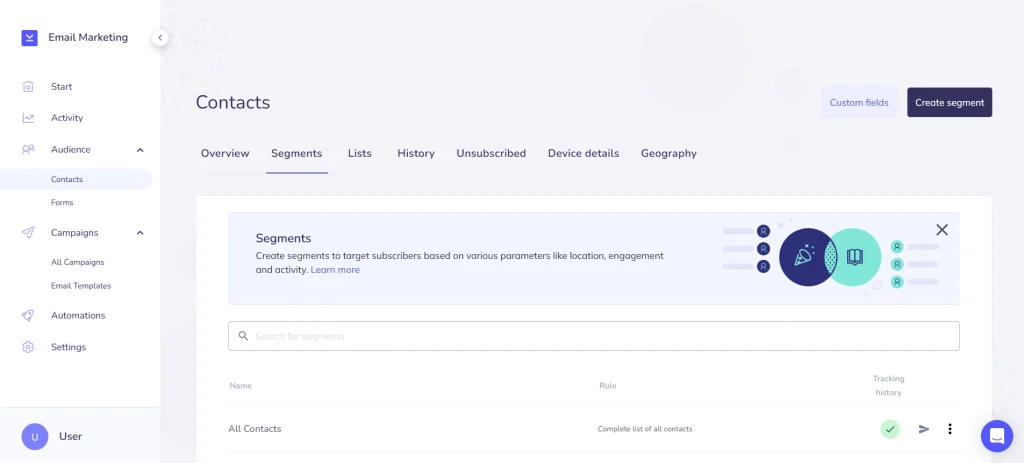
To build a segment in Elastic Email, go to Contacts → Segments → Create Segment.
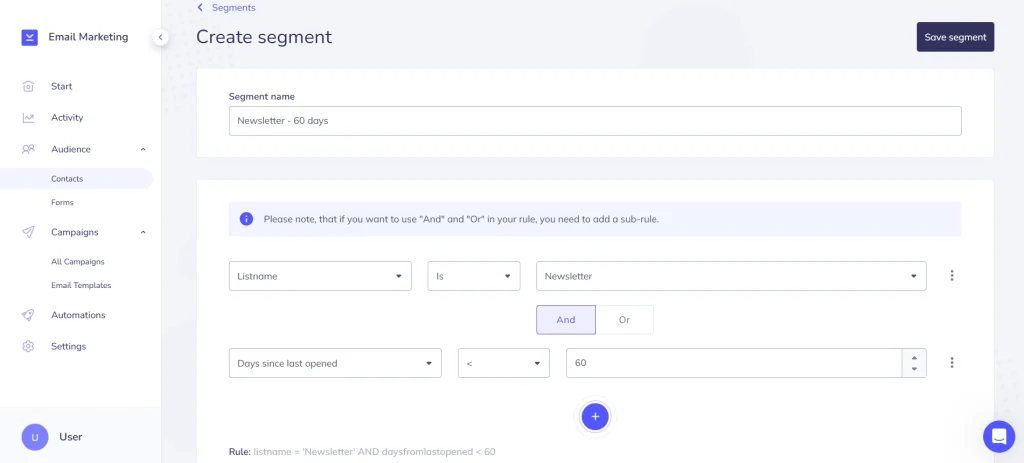
Name it, define your rules, and add sub-rules where you need more precision. For example, you want to create a segment of subscribers who opened your emails in the last 60 days. First, you choose General - Listname, and you provide the list name from which you want to extract these contacts. Then, you click “+” to add another rule. You choose “and” from the “and/or” buttons, and open the dropdown, choose Statistics - Days since last opened. In the next dropdown, you need to choose “<” and type “60” in the input box. You can click Evaluate below to check how many contacts will be added to the segment and what their status is. Once you click Save segment in the top right corner, contacts are sorted automatically from that point on.
Merge fields
Merge fields are placeholder tags in your email template that Elastic Email replaces with real subscriber data at send time. The canonical example is the first name in the subject line or at the beginning of an email. It’s a small thing that reliably shifts attention because it makes the inbox feel like it’s speaking to a person, not bulk sending to a list.
But the real value of merge fields isn’t in the standard ones. It’s in the custom fields you define yourself. It can be a plan tier, industry, company name, anniversary date, or anything your product collects. Used with the rule of only one information in mind, a single well-chosen custom merge field can make an email feel genuinely tailored without feeling too much.
Here are some examples of merge fields:
- Hey {firstname}, something for you → Hey Mia, something for you
- Your {company} team will love this → Your Acme team will love this
- As a {plan} user, you get early access → As a Pro user, you get early access
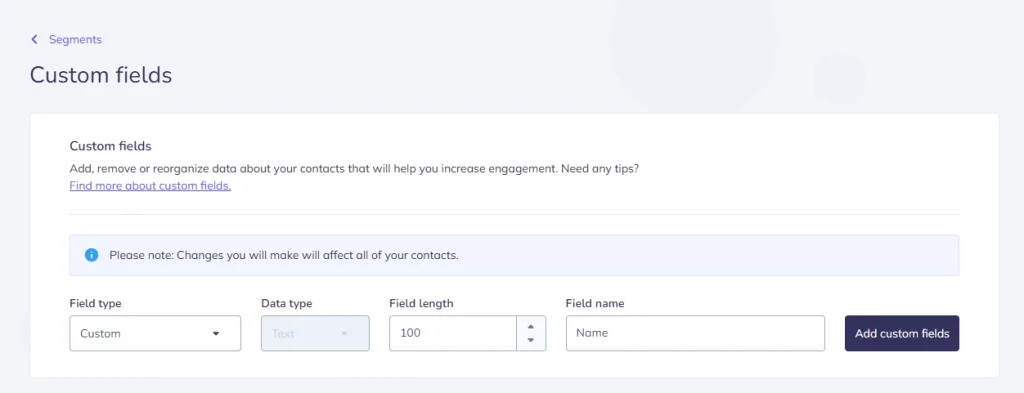
To create custom fields in Elastic Email, go to Contacts and click Custom fields in the top right corner. You’ll see all custom fields added to your account, but you can also create a needed one, choosing its field type, data type, field length, and field name.
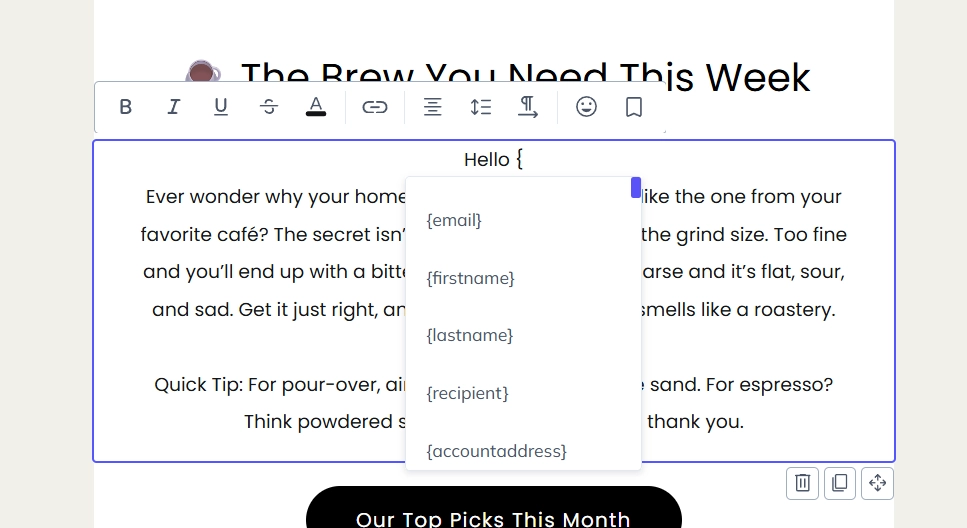
After preparing merge fields, include them in your email. Simply start typing “{“ and your merge fields will appear for you to choose.
One thing worth doing before every send is to preview with a real contact record to confirm fields resolve correctly. A broken merge field that renders {firstname} in a live email undoes more trust than no personalization at all.
Conclusion
Remember that the sweet spot in email personalization is not a fixed variable. It shifts by audience, campaign type, or how much history you have with a subscriber. What does not change is the underlying logic: use what you know to make the message better. Treat personalization as a tool to send tailored and relevant emails. Start with segmentation and merge fields, and add complexity only when you have mastered simpler approaches and you want to go a step further.
If you want to read more about segmentation and merge fields, check our blog or help center. You can always contact our customer support team if you have any questions.
Enjoying this Content?
You can receive articles like this straight to your inbox.
Sign up for our newsletter and get a dose of email marketing knowledge every month!
FAQ
If you like this article, share it with friends:


Ula Chwesiuk
Ula is a content creator at Elastic Email. She is passionate about marketing, creative writing and language learning. Outside of work, Ula likes to travel, try new recipes and go to concerts.

Eager to put this knowledge to some use?
Try one of our products!


