
Table of Contents
Zapier and Elastic Email Integration – How to Use It? Real Use Cases
Integrating your email service provider with third-party tools is essential in today’s digital environment. Most businesses depend on a wide range of software - CRMs, e-commerce platforms, automation systems, and email marketing tools. While each plays an important role, real efficiency is achieved when these tools work together seamlessly through integrations. Zapier is a no-code automation platform that connects over 7,000 apps through automated workflows. It allows tools that don't natively integrate to share data and trigger actions between each other, without any coding required. By integrating Zapier with Elastic Email, businesses can easily automate processes and keep all their systems working together smoothly.
Table of Contents
Connecting Elastic Email with Zapier allows you to automate processes across your entire business ecosystem. Zapier acts as a universal connector, bridging Elastic Email with thousands of apps and workflows, without requiring advanced coding skills. Each automated workflow in Zapier is called a Zap - a connection between two or more apps that runs automatically when a specified condition is met. This integration removes friction between separate software tools, reduces manual work, and ensures information flows reliably across your tech stack. Whether you are collecting leads, nurturing customers, managing transactions, or tracking engagement, a well-connected workflow can significantly boost the efficiency, accuracy, and scalability of your business.
Important note: API keys and SMTP credentials are available in both Elastic Email products - Email Marketing and Email API. This gives users greater flexibility and the ability to choose features and pricing plans that best match their needs.
Elastic Email offers comprehensive email marketing and transactional features, which you can further enhance when you integrate it with your existing business tools. Zapier acts as a universal connector, bridging Elastic Email with thousands of applications for automated workflows.
TL;DR - Elastic Email x Zapier at a glance
What Zapier does for Elastic Email:
Zapier acts as a no-code connector between Elastic Email and thousands of other apps, eliminating manual data entry, syncing contacts automatically, and triggering emails based on real-time events in your CRM, forms, or ad platforms.
Available triggers (what starts a Zap):
Contact added, Contact added to list, Contact triggered automation, Contact unsubscribed, Email opened, Link clicked, Specific link clicked, Get Users Lists.
Available actions (what Elastic Email does in response):
Add a contact, Create list, Delete contact, Delete contact from list, Send campaign, Unsubscribe contact, Find contact, Find contacts in list.
Top use cases covered in this article:
- Auto-add Meta Ads leads to an Elastic Email list and send a welcome campaign
- Notify your sales team when a contact clicks a specific link in a campaign
- Automatically delete unsubscribed contacts to maintain list hygiene and compliance
- Add Typeform or Jotform respondents to Elastic Email with custom fields populated
- Sync CRM contact status changes (HubSpot, Pipedrive) to Elastic Email lists
Why is integrating Elastic Email so important?
- Centralizing your Email Communication
For many companies, Elastic Email is the final step in their workflows - sending confirmations, newsletters, and onboarding sequences. With additional integrations, users can ensure that emails are triggered at the right moment with the most accurate data.
- Eliminating the need for manual data entry
Integrated workflows remove the need to export or import contact lists or manually tag subscribers. Everything happens instantly between apps - for example, between your CRM and Elastic Email.
- Leveling up Customer Experience
Timely communication is key. Order confirmations and system notifications sent within seconds of an action have a direct impact on customer satisfaction.
- Unlocking more real-time automation triggers
Events occurring in your CRM, e-commerce stores, or signup forms can instantly trigger email actions in Elastic Email. Conversely, Elastic Email can send engagement data back to other systems for advanced segmentation and reporting.
Elastic Email built-in triggers and actions in Zapier
Lately, we have added more triggers to our integration with Zapier. We will shortly present to you all of those.
A trigger is the event that starts a Zap - the condition that, when met in one app, automatically sets the workflow in motion. Elastic Email supports the following trigger events:
- Contact added
- Triggers when a new contact with an Active or Engaged status is added to your Elastic Email account.
- Contact added to list
- Triggers when a new contact with Active or Engaged status is added to a specific list.
- Contact triggered automation
- Triggers when a contact is added to an automation.
- Contact unsubscribed
- It triggers when contact status is changed to “Unsubscribed” - whether it’s a manual unsubscribe or via the unsubscribe link.
- Email opened
- Triggers when a contact opens a campaign.
- Get Users Lists
- Triggers when a contact list is fetched from your account.
- Link Clicked
- Triggers when a contact clicks any link in a selected campaign.
- Specific Link Clicked
- Triggers when a contact clicks only a specific link in a selected campaign.
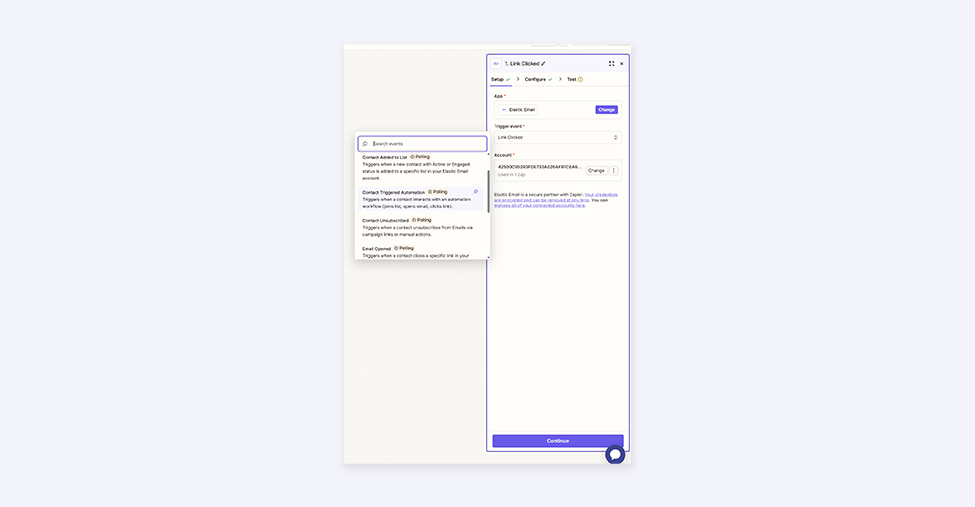
Some of these triggers allow you to gain instant insights into your account performance, others can enhance your account security, and some you can use simply to trigger additional actions in other apps. Later, we will show you practical examples.
An action is what happens in response to a trigger - the task Zapier performs automatically in Elastic Email (or another connected app) once the workflow is activated. Elastic Email supports the following action events:
- Add a contact
- Add a new contact to your Elastic Email account with custom fields.
- Create List
- Create a new list in your Elastic Email’s account.
- Delete Contact
- Deletes a contact from your Elastic email account.
- Delete contact from list
- Deletes a contact from a specific list.
- Send Campaign
- Send a campaign to a specific list or segment.
- Unsubscribe Contact
- Contact is being unsubscribed from your account.
- Find Contact
- Search for a contact by email in your Elastic Email account.
- Find Contacts in List
- Search for contacts in a specific list.
How to use those? I will share with you some useful real-life examples.
Real Zapier + Elastic Email workflow examples
Use case 1: Monitor account security - get notified when lists are fetched
Trigger: Get Users Lists (fires when a contact list is fetched from your account)
Action: Send a notification via your preferred app (e.g., Slack, Gmail)
Outcome: Even when list access is entirely within a team member's responsibilities, monitoring this activity helps you catch unusual behaviour early. You receive an instant alert every time a list fetch, giving you full visibility without manual checking.
For example, if you care about the highest standards of security, in addition to using 2FA and managing granular access, you may still want to be notified when someone fetches specific lists. Even if it’s a team member and completely within their responsibilities, it’s good practice to monitor such activity to find inappropriate behavior beforehand.
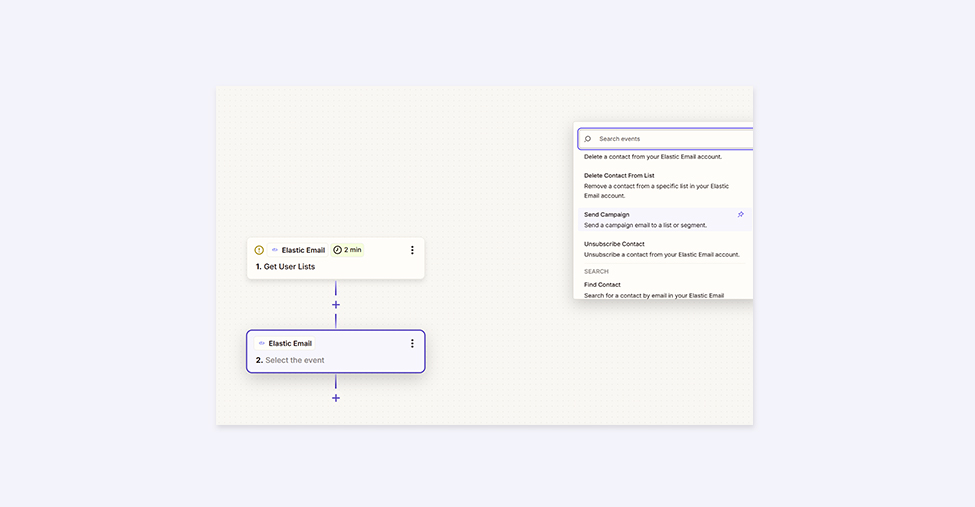
Use case 2: Notify your sales team when a contact clicks a link
Trigger: Specific Link Clicked (fires when a contact clicks a defined link in a selected campaign)
Action: Send an internal notification to your sales team via Slack, email, or CRM
Outcome: Sales reps get an alert in real time when a prospect clicks a high-intent link, such as a demo request or pricing page. This allows them to follow up while interest is highest, directly increasing the chances of conversion.
For sales teams, it’s especially useful to know when someone clicks a particular link in your campaign. Whether it’s related to a virtual demo or extra onboarding, a quick notification lets your team reach out while interest is high. It increases salesmen's chances of reaching clients when they are really thinking about your product.
Use case 3: Automatically remove unsubscribed contacts
Trigger: Contact Unsubscribed (fires when a contact's status changes to Unsubscribed)
Action: Delete Contact from your Elastic Email account
Outcome: Unsubscribed contacts are removed instantly and automatically, with no manual list exports or imports needed. This protects your sender reputation, keeps your list clean, and eliminates the risk of accidentally emailing unsubscribed contacts in violation of GDPR or CAN-SPAM.
And one more example - if you care about list hygiene, you might want to remove unsubscribed users immediately. You don’t have to do it manually - you can automate the entire process instead. Use “Contact unsubscribed” as a trigger and “Delete Contact” as an action. With this workflow, you can be sure that all unsubscribed users are deleted from your account. It also eliminates the risk of any compliance breach from accidentally sending emails to them.
Integrating external tools with Elastic Email via Zapier
As you can see, there are multiple triggers and actions that you can set up immediately. If you want to use Zapier as a connector between Elastic Email and other tools, that’s possible as well. Here are some examples that might be useful for your business.
Use case 4: Add Meta Ads leads to Elastic Email and send a welcome campaign
Trigger: New lead captured in Meta Lead Ads
Action: Add contact to a specific Elastic Email list → Send campaign to that list
Outcome: Every new lead from your Meta ad is automatically added to Elastic Email and immediately receives your prepared welcome or nurture email - no manual CSV downloads or uploads required. The result is faster follow-up, higher lead engagement, and a fully automated top-of-funnel workflow.
For example, you are running Meta Lead Ads to expand your customer lists. You want to immediately reach those contacts with a dedicated campaign in Elastic Email. Without integration, you would have to manually download the list and upload it one by one - or via a CSV file - before setting up automation or sending a campaign. With integration, however, you can automate the entire process by selecting the appropriate triggers and actions. It could look like this:
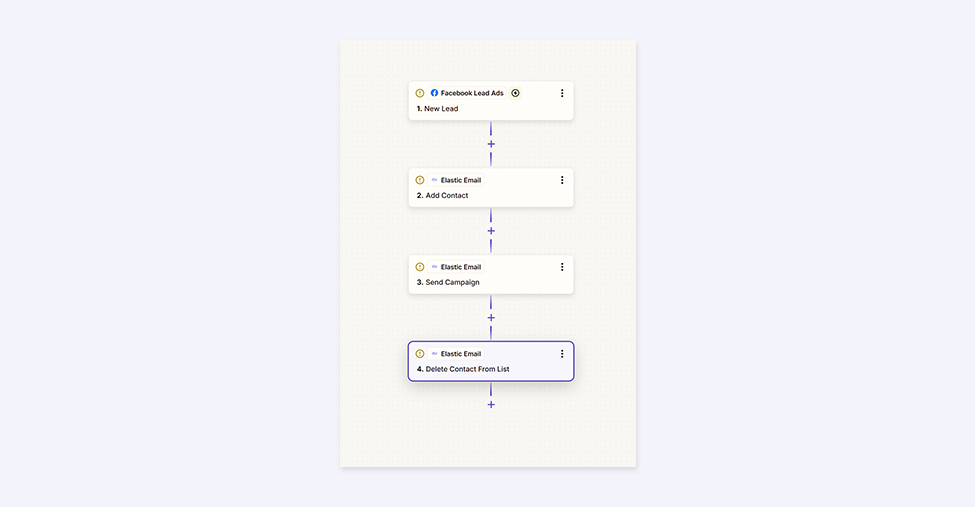
This workflow automatically captures new Meta Ads leads, adds them to a specific Elastic Email list, and sends them your prepared email. Another useful example is connecting with Typeform (or Jotform or similar). Users fill out a reservation form and provide all the required information. Contacts are automatically added to Elastic Email, with custom fields populated, and in the next step, an introductory email is sent with all the necessary information.
Use case 5: Sync CRM contact status changes to Elastic Email
Trigger: New deal created or contact status changed in HubSpot or Pipedrive
Action: Add contact to a specific Elastic Email list
Outcome: When a contact moves through your sales pipeline, they automatically appear in the corresponding Elastic Email list, triggering the right email sequence for their stage. Both tools stay in sync in real time, giving your sales and marketing teams an accurate, unified view of each contact.
Via Zapier, you can also connect Elastic Email with your CRM, for example, HubSpot or Pipedrive. When a new deal is created or a contact’s status changes, the specific user can be added to a selected contact list in Elastic Email. This integration allows you to have more control over your clients, with immediate status updates in both tools that are crucial for your business.
Elastic Email x Zapier - summary
We are approaching a point where integrations will not be just a “nice to have” but a “must-have,” not only for large companies but also for growing businesses. They not only save time and help bypass repetitive tasks, but they also have a significant impact on daily workflows and the overall quality of work. Connecting different tools produces the best results.
That’s why we are constantly working to expand the range of integrations available to our users. Recently, we added Canva, which you can read about here. And in January, we have more surprises for you - this time aimed at making your e-commerce email workflows even easier. Stay tuned!
You can find the full list of Elastic Email integrations here.
Enjoying this Content?
You can receive articles like this straight to your inbox.
Sign up for our newsletter and get a dose of email marketing knowledge every month!
FAQ
Does Elastic Email integrate with Zapier?
Yes. Elastic Email has a native integration with Zapier that supports both triggers and actions. Triggers include events such as a contact addition, a link click, or a contact unsubscribing. Actions include adding contacts, creating lists, sending campaigns, and deleting contacts. The integration is available to users on both the Email Marketing and Email API products.
What is a Zap?
A Zap is an automated workflow in Zapier that connects two or more apps. It consists of a trigger, an event that starts the workflow, and one or more actions that run automatically in response. For example, a Zap might trigger when a new lead capture in Meta Ads and automatically add that contact to an Elastic Email list.
What Zapier triggers does Elastic Email support?
Elastic Email supports eight trigger events in Zapier: Contact added, Contact added to list, Contact triggered automation, Contact unsubscribed, Email opened, Get Users Lists, Link clicked, and Specific link clicked. You can use these triggers to start workflows in thousands of other apps connected through Zapier.
What Zapier actions does Elastic Email support?
Elastic Email supports eight action events in Zapier: Add a contact, Create list, Delete contact, Delete contact from list, Send campaign, Unsubscribe contact, Find contact, and Find contacts in list. These actions happen automatically in your Elastic Email account when a trigger fires in a connected app.
Do I need coding skills to set up the Elastic Email–Zapier integration?
No. Zapier is a no-code platform, meaning you can build automated workflows between Elastic Email and other apps entirely through a visual interface - no API calls or custom code required. API keys and SMTP credentials for the connection are available in both the Elastic Email Marketing and Email API products.
What apps can I connect to Elastic Email via Zapier?
Zapier connects Elastic Email to over 7,000 apps. Common use cases include connecting to CRMs like HubSpot and Pipedrive, ad platforms like Meta Lead Ads, form tools like Typeform and Jotform, communication tools like Slack and Gmail, and e-commerce platforms. You can combines Any app available on Zapier with Elastic Email triggers and actions.
How can I use Zapier to keep my Elastic Email list clean?
You can set up a Zap that uses "Contact unsubscribed" as the trigger and "Delete contact" as the action. This automatically removes any contact from your Elastic Email account the moment they unsubscribe, eliminating the risk of accidentally sending to them again and helping maintain compliance with GDPR and CAN-SPAM requirements.
Can I automatically add leads from Meta Ads to Elastic Email?
Yes. Using Zapier, you can connect Meta Lead Ads to Elastic Email so that every new lead capture by your ad automatically lands in a specific contact list in your Elastic Email account. You can then chain a "Send campaign" action to immediately trigger a welcome or nurture email to that contact.
If you like this article, share it with friends:


Filip Blajet
Filip is a marketing specialist and content author, who spends a lot of time with data and ads. Outside of work, he loves football, binge watching tv series and travelling.



Eager to put this knowledge to some use?
Try one of our products!


