
Table of Contents
Elastic Email 2025: Year in Review
As 2025 comes to a close, we’d like to take a moment to recap what we achieved as a company and what a year it has been. We can surely say that 2025 was a landmark year for Elastic Email. It was marked by a strategic expansion that positioned the company as a comprehensive platform not only for email marketing and email API, but also as a tool for creators, a leader in AI-driven email innovation, and now, as a powerful communication software. The nine major launches in 2025, summarized below, collectively transformed Elastic Email from an email delivery service to a modern communication platform for growing businesses.
Table of Contents
- TL;DR - Elastic Email 2025 feature summary
- 1. Creator Suite product Launch
- 2. Checkouts
- 3. Paid Newsletters
- 4. AI Template Designer
- 5. Web Gallery of Email Templates
- 6. MCP Email Server
- 7. Elastic Email Inbox
- 8. Integration with Canva
- 9. Email Marketing Campaigns Optimization
- Elastic Email 2025 - Conclusion
- FAQ
TL;DR - Elastic Email 2025 feature summary
- Creator Suite - an all-in-one workspace for content creators - signup forms, email designer, automation, analytics, and monetization tools in one place.
- Checkouts - enables creators to sell digital products (e-books, courses, templates, music) directly from a myelasticemail.com product page.
- Paid Newsletters - A built-in subscription model allowing creators to charge for premium newsletter content, with Stripe payment processing included.
- AI Template Designer - generates professional email templates from a natural language prompt - no design skills required.
- Web Gallery of Email Templates - makes Elastic Email's pre-built template library publicly accessible from the website, not just inside the app.
- MCP Email Server - connects Elastic Email to external AI tools so users can manage email campaigns using natural language commands.
- Inbox - a new standalone product offering Team Chat, Live Chat, and Help Desk - unifying internal and customer communication.
- Canva integration - lets users design in Canva and export directly to Elastic Email, with shared media libraries between both platforms.
- Campaign Optimization Updates - smarter contact uploads (auto-detects email column), contact exclusion in campaign setup, and "send at local time" scheduling (coming soon).
1. Creator Suite product Launch
The launch of Creator Suite in April 2025 was a significant strategic move this year. This new product provided content creators with a centralized workspace. Creator Suite consolidated essential tools into a clean and focused interface.
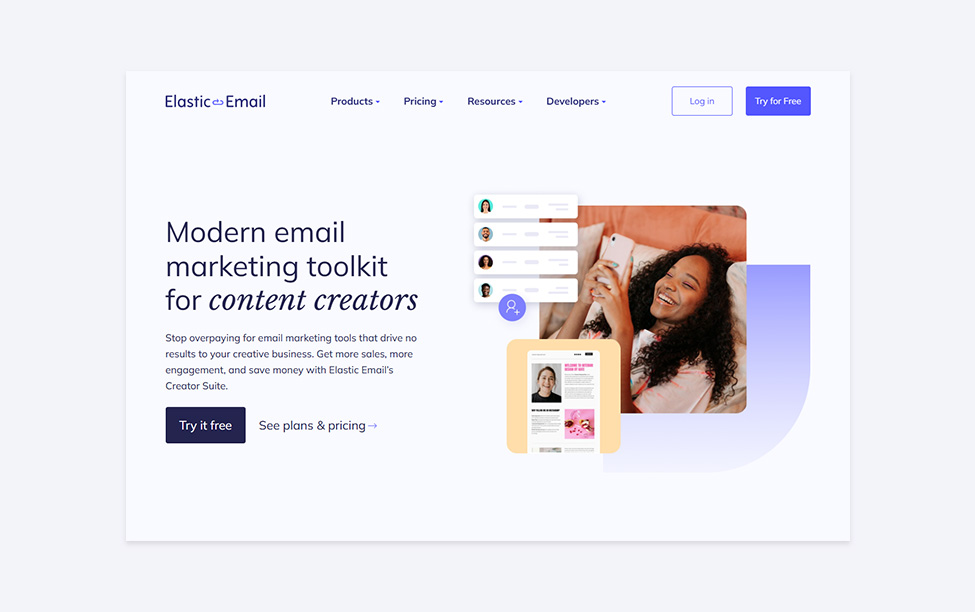
Now, creators can use it to attract new leads with signup forms and a link in bio tool, as well as store and segment their contacts. Users can create compelling email templates from scratch using the AI-powered email designer, or use one of the ready-made templates from our gallery and adjust it to their needs. Creators can send their newsletters, automate their email flows, and monitor their success thanks to detailed campaign analytics. Finally, they can earn money thanks to monetization features, such as Paid Newsletters or Checkouts, which leads us to the next two Elastic Email milestones.
2. Checkouts
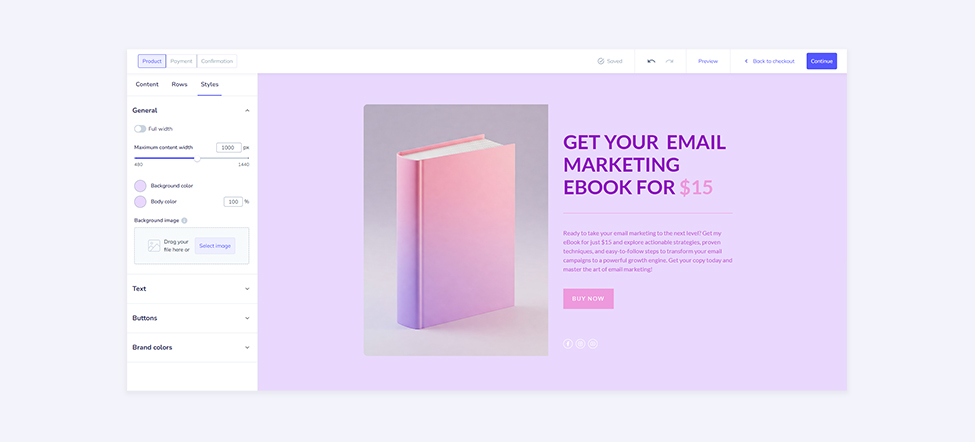
Alongside Creator Suite, Elastic Email also introduced Checkouts. This feature added monetization capabilities to the Elastic Email offer. It enables seamless sale of digital products, for example, e-books, courses, templates, music, software, and more. Create your product page on the myelasticemail.com domain, set up a checkout flow, and start earning.
3. Paid Newsletters
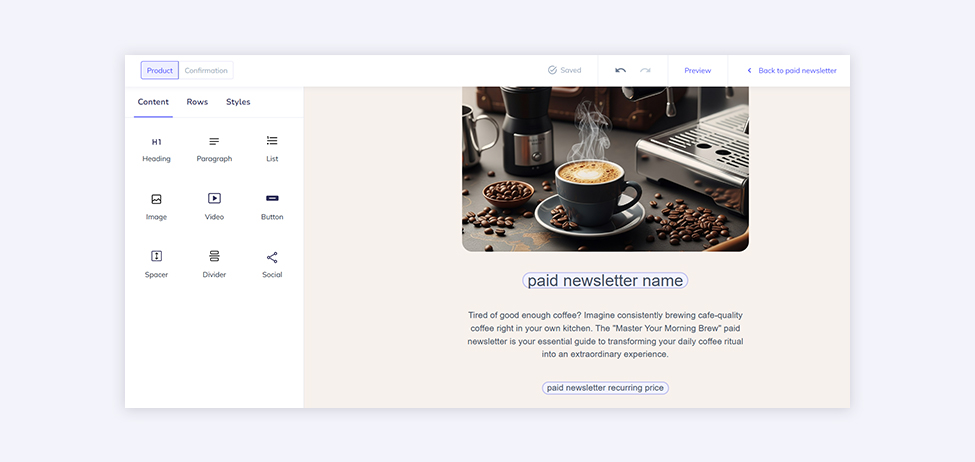
The second monetization feature introduced this year was Paid Newsletters. It provides creators and marketers with a robust, built-in subscription model. You can offer paid premium newsletters only to subscribers who have paid the required fee. In addition, Paid Newsletters allows you to create an entire workflow. From designing and publishing an attractive product page with the myelasticemail.com domain to advertise your premium content through processing secure payment in Stripe to sending your amazing content to your subscribers. As a result, this feature empowers creators to build sustainable and audience-supported businesses directly on the Elastic Email platform.
4. AI Template Designer
Elastic Email made a major leap in design accessibility with the launch of AI Template Designer this year. Specifically, this feature allows users to generate professional and tailored email templates using simple and natural language prompts. As a result, by dramatically lowering the barrier to high-quality email template designs, AI Template Designer ensures that users of all skill levels can produce visually stunning and effective email campaigns.
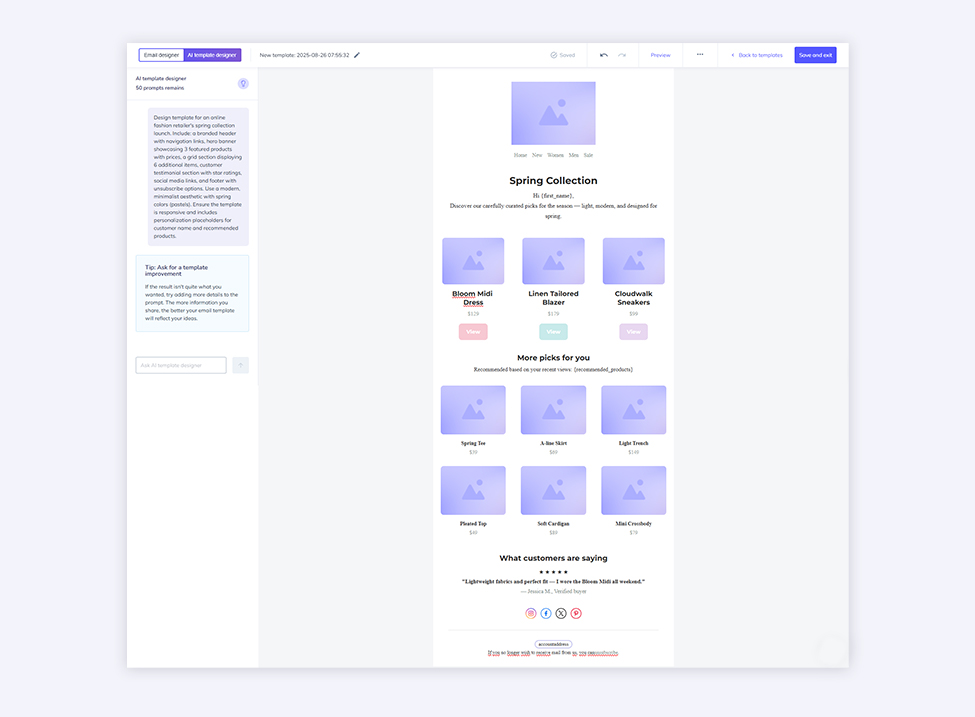
To generate a template, simply provide a prompt describing your campaign goal and desired elements. For instance, you can specify the number of images, columns, rows, blocks, and background and text colors. Afterwards, refine the result by continuing to prompt the AI. Alternatively, switch to the manual email designer for direct edits.
5. Web Gallery of Email Templates
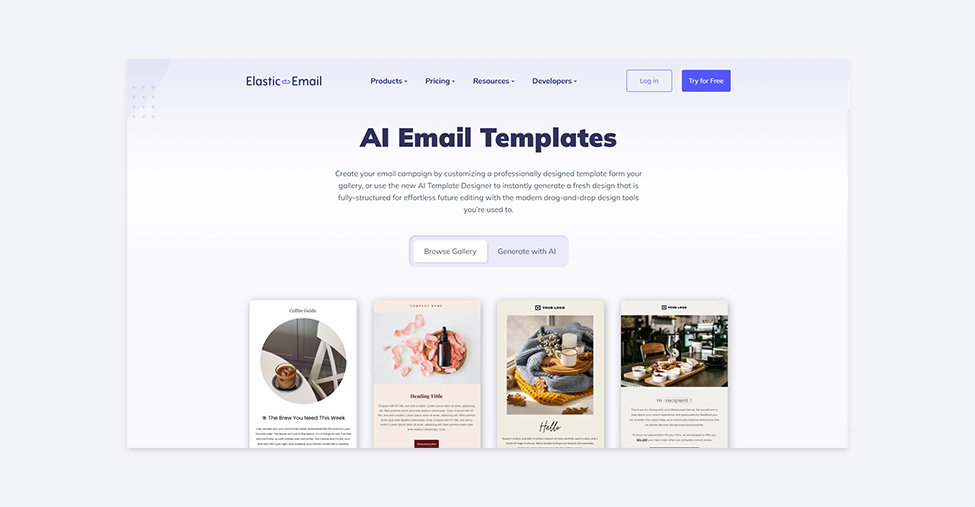
After many years of offering a free gallery of pre-built email templates within the application, Elastic Email decided to make them available from the website. Now, not only users but also website visitors can look through ready-made templates offered. People can preview each template in the desktop and mobile view, and when they’re ready to use it or adjust it to their needs, they are redirected to the app or to the sign-up screen, where they can create their Elastic Email account. Once they’re in the app, users can edit the template in AI Template Designer or manually in the regular email designer.
6. MCP Email Server
The MCP Email Server launched in October 2025, marking a forward-looking step into AI-driven email management. It connects Elastic Email's sending infrastructure with external AI tools, such as large language models. Users can manage campaigns and email operations using natural language commands. This positions Elastic Email at the forefront of the AI-powered communication revolution.
Detailed documentation with request samples, as well as the help center article about Elastic Email MCP and the YouTube guide teaching how to manage your email with an AI agent, creates comprehensive help when users create their own AI agent to handle their email operations.
7. Elastic Email Inbox
In November 2025, Elastic Email expanded its product offer beyond email marketing and email API with the introduction of Inbox, a completely new product. Elastic Email Inbox was designed as an all-in-one communication platform, especially for growing businesses, to unify team and customer communication. It provides a centralized hub for managing internal and external messages, positioning Elastic Email as a comprehensive solution for business communication.
Elastic Email Inbox, as of now, offers three functionalities - Team Chat, Live Chat, and Help Desk. Team Chat is an internal chat for team members to communicate and coordinate daily work. It can be used to create dedicated group chats and channels, as well as send private, one-on-one messages to any teammate. Live Chat is a tool for real-time conversations with your website visitors thanks to an embedded chat widget. The last feature, Help Desk, is a centralized space where communication with customers is collected. It is designed to organize incoming messages and facilitate collaborative team responses.
8. Integration with Canva
Elastic Email offers a lot of integrations and plugins to connect with your favorite tools and streamline your workflow. This year, we created a really crucial integration with Canva. This strategic partnership allows users to seamlessly leverage Canva’s design tools and asset library directly within the Elastic Email workflow. From now on, users can create stunning designs in Canva and easily export them to their Elastic Email account. Also, all images added to the media manager in Elastic Email will be visible in their Canva account. This integration streamlines the process of creating visually rich content, making it faster and easier to design professional-grade email templates.

9. Email Marketing Campaigns Optimization
Elastic Email also aims to make the email campaign sending even easier and smoother, so we introduced a few adjustments to the already existing functionalities. The first one is the enhanced contact upload feature. Now, users no longer need to include a column name “email”, as the system will automatically scan and identify the email addresses in the files. Another adjustment was to add the contact exclusion option in the campaign setup. It allows users to exclude certain lists or segments from the recipients of a certain email campaign.
We're also planning to release a "send at local time" scheduling feature in the new year. It will send campaigns to each recipient at the same local time, regardless of time zone. This is especially valuable for global campaigns containing time-sensitive promotions. It's also crucial for event announcements and reminders, where timing directly impacts engagement.
Elastic Email 2025 - Conclusion
2025 was a year of monumental updates for Elastic Email. First, Creator Suite, Checkouts, and Paid Newsletters established Elastic Email as a monetization engine for content creators. Meanwhile, the AI Template Designer, Canva integration, and MCP Email Server demonstrated Elastic Email's commitment to technological leadership. Furthermore, Inbox expanded Elastic Email beyond email into a comprehensive, all-in-one communication platform. Altogether, these launches set a strong pace for the years to come.
Enjoying this Content?
You can receive articles like this straight to your inbox.
Sign up for our newsletter and get a dose of email marketing knowledge every month!
FAQ
What new features did Elastic Email launch in 2025?
Elastic Email launched nine major features in 2025: Creator Suite, Checkouts, Paid Newsletters, AI Template Designer, a public Web Gallery of Email Templates, the MCP Email Server, Elastic Email Inbox, a Canva integration, and several email campaign sending optimizations. Specifically, these launches spanned monetization, AI-driven design, and unified communication. As a result, Elastic Email successfully transitioned from an email delivery service into a broader communication and monetization platform.
What is Elastic Email Creator Suite?
Creator Suite is an all-in-one workspace designed for content creators and independent publishers. It combines signup forms, a link-in-bio tool, contact management, an AI-powered email designer, newsletter sending, automation workflows, campaign analytics, and monetization features - all within a single, focused interface on the Elastic Email platform.
Can I sell digital products with Elastic Email?
Yes. Elastic Email introduced two monetization features in 2025: Checkouts and Paid Newsletters. Checkouts lets you sell digital products, such as e-books, online courses, design templates, or music tracks, through a product page hosted on the myelasticemail.com domain. Paid Newsletters lets you charge subscribers a recurring fee for access to premium newsletter content, with payments processed via Stripe.
What is the Elastic Email AI Template Designer?
The AI Template Designer is a feature that generates complete, professional email templates from a natural language prompt. You describe the goal of your campaign, the layout you want, colors, image count, and content blocks, and the tool produces a ready-to-use template. You can then refine it by continuing to prompt the AI or switch to the manual email designer for fine-grained edits.
What is the Elastic Email MCP Email Server?
MCP (Model Context Protocol) is an open standard that lets AI tools connect with external services. The Elastic Email MCP Email Server links Elastic Email with external AI tools via this protocol. Users can then manage campaigns, check logs, and perform email operations using natural language. No manual platform navigation needed.
What is Elastic Email Inbox?
Elastic Email Inbox is a standalone communication product launched in November 2025. It offers three tools: Team Chat (an internal messaging space for colleagues, with channels and direct messages), Live Chat (a website-embedded widget for real-time conversations with visitors), and Help Desk (a centralized inbox for managing and collaborating on customer support requests). It is designed as a unified communication hub for growing businesses.
Does Elastic Email integrate with Canva?
Yes. The Elastic Email-Canva integration, launched in 2025, allows users to design visuals in Canva and export them directly into their Elastic Email account. Images added to the Elastic Email media manager also sync to the user's Canva account, keeping design assets consistent across both platforms without manual file transfers.
Can I browse Elastic Email templates without creating an account?
Yes. In 2025, Elastic Email made its template gallery publicly available on the website. Anyone can browse and preview templates in desktop and mobile view without logging in. When ready to use a template, visitors are directed to the app or to the sign-up screen to create a free account, after which the template can be edited in the AI Template Designer or the standard email designer.
If you like this article, share it with friends:


Ula Chwesiuk
Ula is a content creator at Elastic Email. She is passionate about marketing, creative writing and language learning. Outside of work, Ula likes to travel, try new recipes and go to concerts.

Eager to put this knowledge to some use?
Try one of our products!


